While surfing the web, we discovered a typosquatted website impersonating the official Telegram download portal that was actively distributing malware. The domain telegrgam[.]com hosts a malicious installer named tsetup-x64.6.exe, which appears to be a legitimate Telegram setup file.
However, further analysis revealed that it performs several malicious actions, including modifying Windows Defender settings, dropping staged payload files, and executing a malicious DLL loader.
The AutoRecoverDat.dll reads encoded payload data stored in XML files and reconstructs a PE payload at runtime. Instead of writing the payload to disk, it is loaded into memory using legitimate Windows utilities, helping the malware evade traditional file-based detection. Once executed, the malware establishes communication with its command-and-control (C2) server to receive updates from the attacker and maintain persistent communication with the infected system.
In this blog, we walk through the full analysis of this malware campaign from the fake Telegram installer and execution chain to payload delivery and C2 communication.
Initial Access – Fake Telegram Website
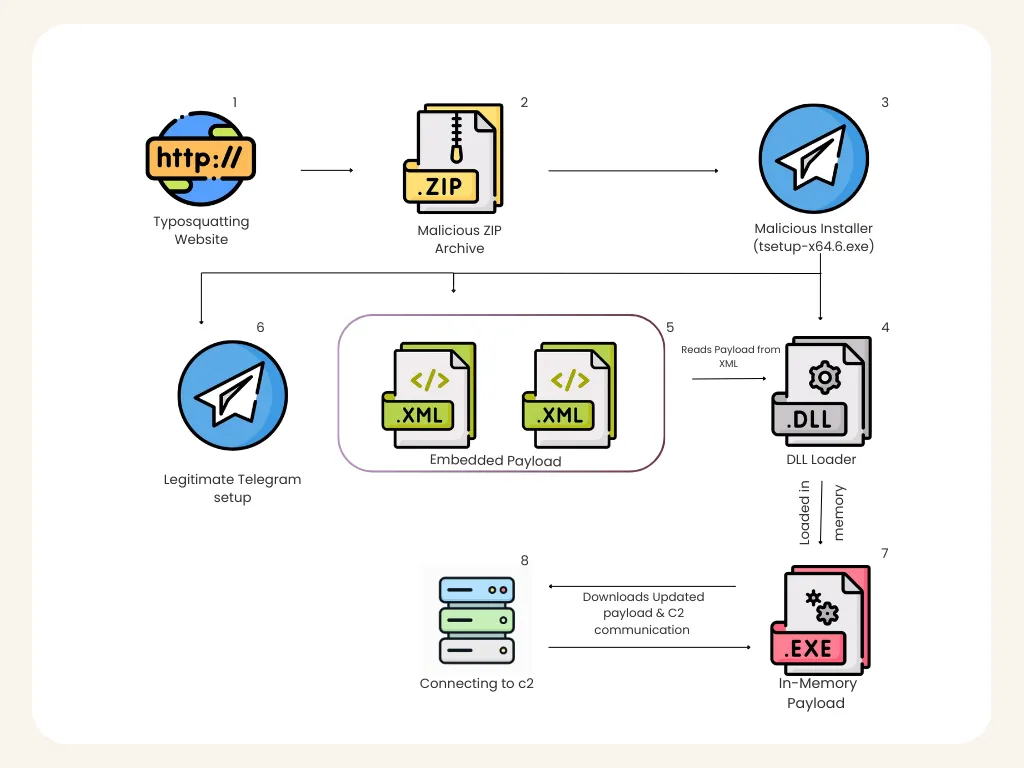
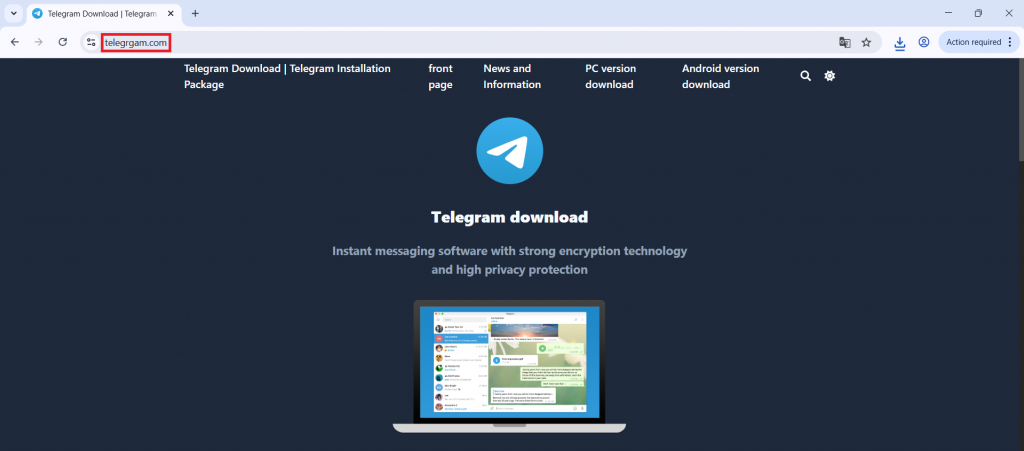
The infection chain begins with a typosquatted Telegram domain designed to trick users searching for Telegram downloads.
Example malicious domain:
hxxps[://telegrgam[.com
The website visually resembles the official Telegram download page and prompts users to download a Windows installer.
Downloaded file:
tsetup-x64.6.exe
Because users expect Telegram installers to use similar naming conventions as a regular setup executable, the malicious file appears legitimate.
Once executed, the installer initiates a multi-stage malware deployment process.
Execution Phase – Installer Behaviour
During installation, the executable launches several commands through cmd.exe, indicating suspicious behaviour.
Process Discovery
The installer executes the following command:

This command enumerates running processes and searches for:
0tray.exe
This behaviour suggests the malware may be checking for previous infections or monitoring/security software.
Windows Defender Bypass
One of the first major malicious actions observed is the modification of Windows Defender exclusion rules.
The malware executes the following obfuscated command:

After removing obfuscation, the command resolves to:
powershell.exe -ExecutionPolicy Bypass -Command Add-MpPreference -ExclusionPath C:\,D:\,E:\,F:\
This command adds all the drive partitions in the system to Windows Defender exclusions. This significantly reduces the likelihood of detection and allows the malware to operate without antivirus scanning.
Registry Modification
The installer creates a registry entry used for identification.

This registry value likely serves as an infection marker, allowing the malware to determine if the system has already been infected.
This prevents redundant infections and may also be used by the malware during updates.
Payload Staging
The malware drops multiple files into the following directory:
C:\Users\<User>\AppData\Roaming\Embarcadero\
Files dropped include:
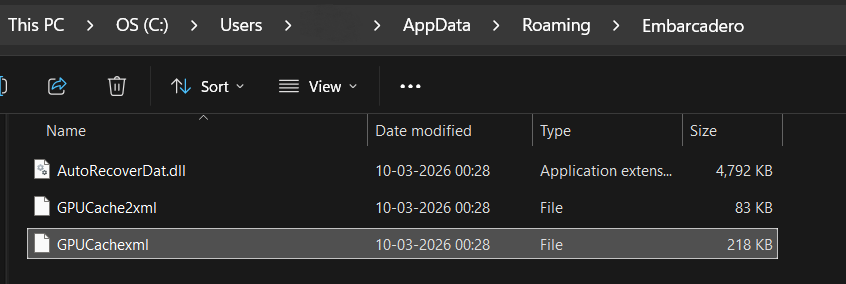
Notably, the malware uses legitimate-looking file names to avoid suspicion.
The directory name Embarcadero is also commonly associated with legitimate development tools, which further reduces suspicion during manual inspection.
Fake Telegram Installation
The installer also drops a legitimate Telegram installer to maintain the illusion of legitimacy.
File dropped:
C:\Program Files (x86)\Applica\telegrom.exe
This executable appears to be a legitimate Telegram installer created with Inno-Setup.
This tactic is commonly used in malware campaigns to ensure that the user does not suspect malicious activity, since Telegram appears to install successfully.
Malicious DLL Execution
After dropping the payload files, the malware launches the following command:

This executes the DLL using rundll32.exe, which is a legitimate Windows utility used to execute DLL exports.
However, the DLL is not a legitimate COM component, despite exposing the export:
DllRegisterServer
This export is used as an entry point for malicious code execution.
XML-Based Payload Storage
While reversing the DLL, it was discovered that the payload is not directly stored in the DLL.
Instead, the DLL reads the following files:
GPUCache.xml
The XML file contains encoded binary data representing a portable executable (PE) payload. The malware performs the following actions:
- Reads XML file
- Extracts embedded binary data
- Reconstructs PE file
- Loads PE manually into memory
This technique is known as manual PE loading (reflective loading technique).
In-Memory Execution
Once the payload is reconstructed, it is loaded directly into memory.
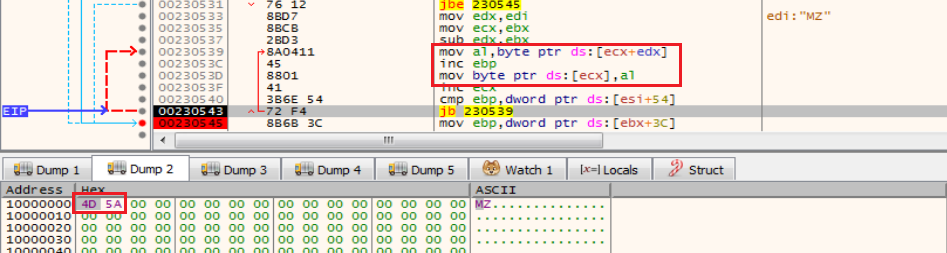
Instead of writing the PE to disk, the malware performs:
- Memory allocation
- PE mapping
- Import resolution
- Execution transfer
The payload executes inside rundll32.exe, which helps the malware blend in with legitimate system processes.
This behavior was confirmed using x32dbg, where the PE was observed being reconstructed and executed at runtime.
Command-and-Control Communication
After the payload is successfully loaded into memory, the malware initiates communication with its command-and-control infrastructure.
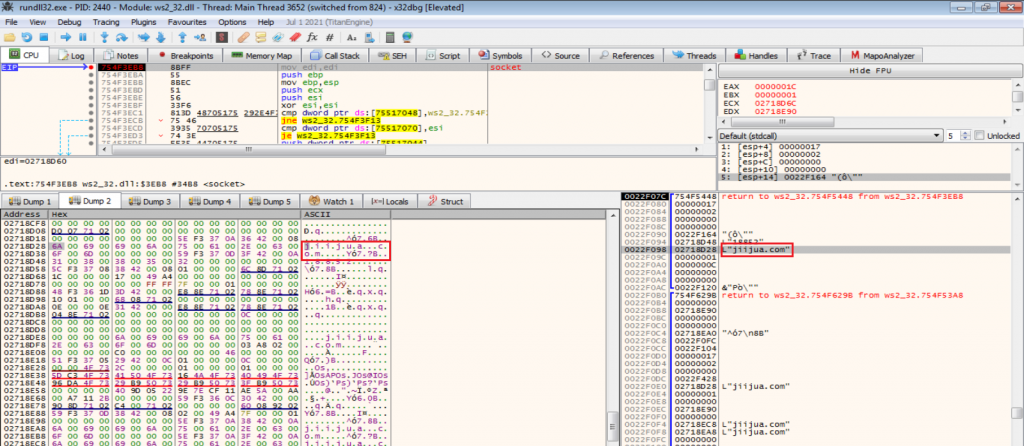
Observed network connection:
27[.50[.59[.77[:18852
Associated domain:
jiijua[.]com
The malware establishes a TCP connection to this server.
This communication allows the malware to:
- Receive commands
- Update payloads
- Maintain persistent communication
C2 Communication
Once the malware establishes communication, it continues making repeated connections to the C2 server.
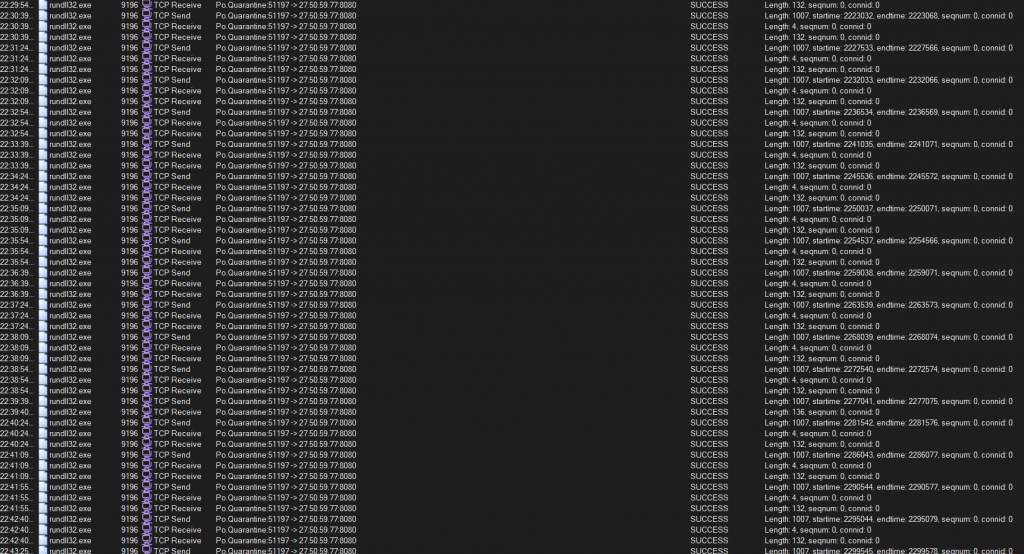
This persistent connection likely supports:
- Remote command execution
- Data exfiltration
- Payload updates
- System monitoring
Such persistent communication is typical in remote access trojans and loaders.
Payload Update Mechanism
Network traffic analysis using Wireshark revealed that the malware downloads updated payload components from the C2 server.
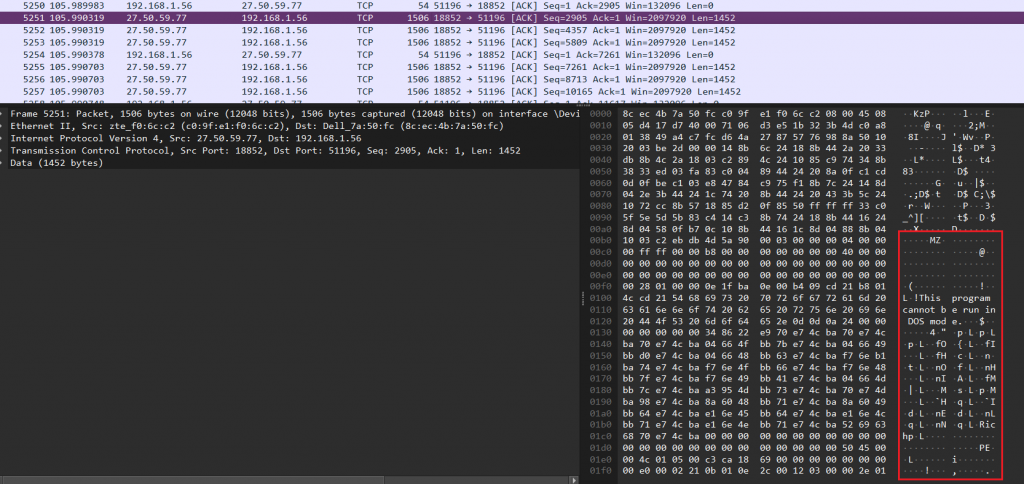
The update mechanism works as follows:
- Malware connects to C2 server
- Server delivers updated payload
- Payload is loaded at runtime
- Malware continues communication
This architecture allows attackers to dynamically update the malware without redistributing the original installer.
MITRE ATT&CK Mapping
The observed behaviour of the malware aligns with several tactics and techniques defined in the MITRE ATT&CK framework. Mapping malware activity to ATT&CK techniques helps security teams detect and mitigate similar threats.
| ATT&CK Tactic | Technique ID | Technique | Observed Behaviour |
| Initial Access | T1189 | Drive-by Compromise | Malware distributed through fake Telegram website |
| Execution | T1059.003 | Command Shell | Malware executes commands using cmd.exe |
| Execution | T1059.001 | PowerShell | PowerShell used to modify Defender settings |
| Defence Evasion | T1562.001 | Disable Security Tools | Windows Defender exclusions added |
| Defence Evasion | T1027 | Obfuscated/Compressed Files | PowerShell command obfuscation |
| Persistence | T1112 | Modify Registry | Registry key HKCU\Microsoft User\Source created |
| Defence Evasion | T1218.011 | Signed Binary Proxy Execution | Payload executed via rundll32.exe |
| Defence Evasion | T1620 | Reflective Code Loading | PE payload reconstructed from XML and loaded in memory |
| Command and Control | T1071 | Application Layer Protocol | TCP communication with remote server |
| Command and Control | T1105 | Ingress Tool Transfer | Malware downloads updated payload from C2 |
IOCs
| MD5 | Detection Name |
| A9A5CC6B6766FEC51B281B94F5F17CCD (tsetup-x64.6.exe) | Trojan(005cea261) |
| 62F8EFFC7690455ABCB300E3574F0A93(Loaded Payload) | Trojan(005d198a1) |
Command and Control (C2)
- 27.50.59.77:18852
- jiijua.com
Typosquatted Domains
- www.telegrgam.com
- www.telefgram.com
- www.tejlegram.com
This campaign demonstrates how attackers use typosquatted websites and social engineering to distribute malware disguised as legitimate software. In this case, a fake Telegram download delivers a multi-stage loader that bypasses security defenses, stages payload components, loads the malware into memory, and establishes communication with its command-and-control (C2) server.
Techniques such as Defender exclusion modification, reflective payload loading, and runtime updates allow the malware to evade traditional detection methods.
To mitigate such threats, users should download software only from official sources. Security solutions like K7 Antivirus, which offer malicious website blocking, can help prevent users from accessing harmful domains and stop malicious downloads before they reach the system.