
We came across fake Microsoft Teams distribution sites, shared on X platform back in mid April. The websites closely mimic the legitimate Microsoft Teams download page, using lookalike domains to trick users into downloading a trojanized installer packaged as a zip archive.
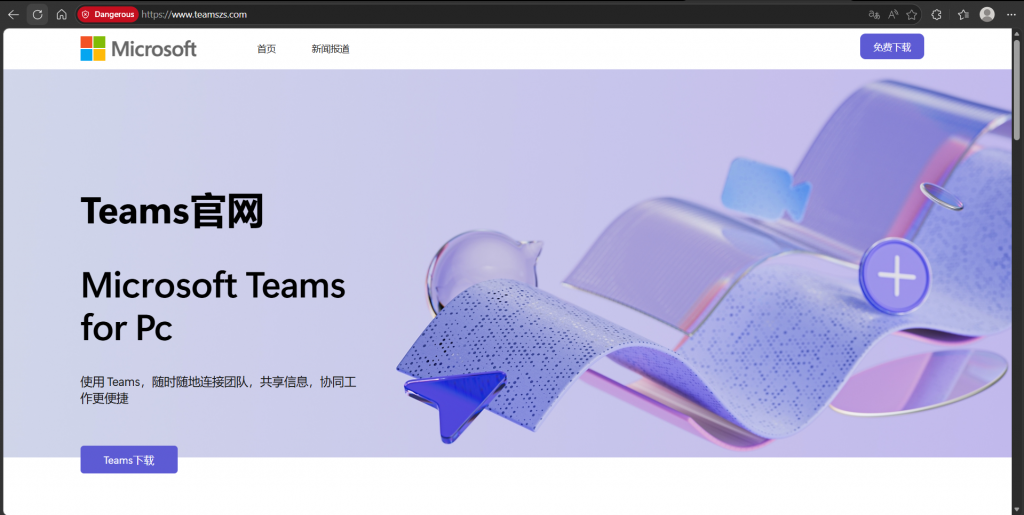
Our investigation revealed that the delivered payload leverages a DLL sideloading chain via a legitimate executable (GameBox.exe) developed by Tencent, ultimately deploying a ValleyRAT variant. Indicators such as Chinese language artifacts within fake sites and log data suggest a likely connection to threat activity originating from China.
This malware campaign stands out for its clean execution chain, combining social engineering with staged payload delivery, in-memory decryption, and stealthy persistence mechanisms.
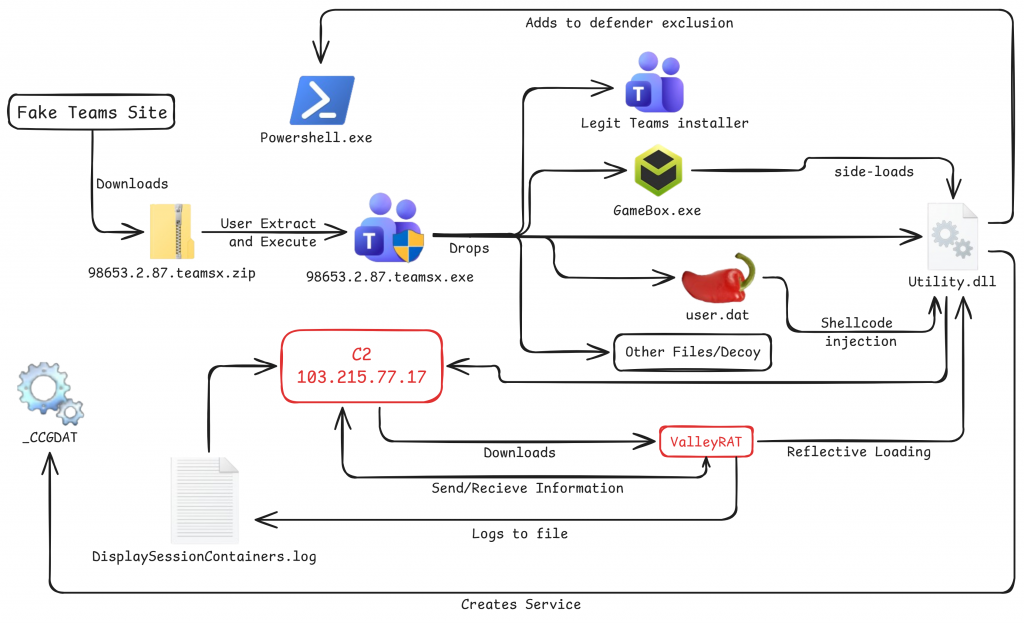
The infection chain begins with domains such as teams-securecall[.]com and teamszs[.]com, which are designed to closely resemble the official Microsoft Teams download page and thereby encourage unsuspecting users to trust the download.
Upon visiting the site, users are prompted to download a compressed archive named as:
98653.2.87.teamsx.zip
571.0.2.6.8.97teamsxb.zip
521.0.3.6.987teamsx.zip
NSIS Installer Execution
Once extracted and executed, the archive launches a malicious NSIS based installer, which serves the initial stage of the attack. Rather than performing a standard software installation, the installer acts as a deployment mechanism, dropping multiple components across the system, including a loader, a malicious DLL, and supporting binaries.
The installer also includes a legitimate Microsoft Teams installer and a corresponding shortcut is created on the user’s desktop. This helps avoid suspicion by presenting an expected behavior to the user while the malicious components are silently installed in the background.
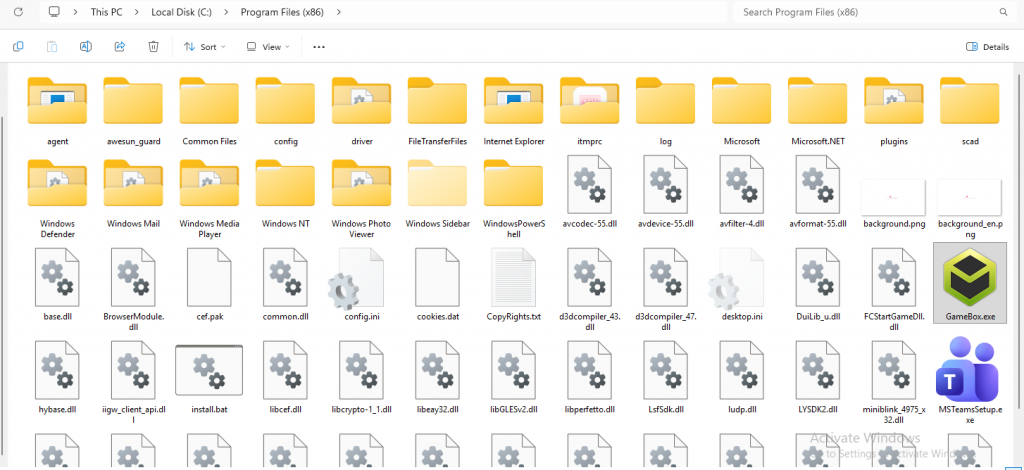
A key element of this stage is a legitimate executable (GameBox.exe) being abused to side-load a malicious dll named utility.dll.
Windows Defender Evasion
As a first step the malware after execution weakens the system’s defenses by modifying the Windows Defender settings.
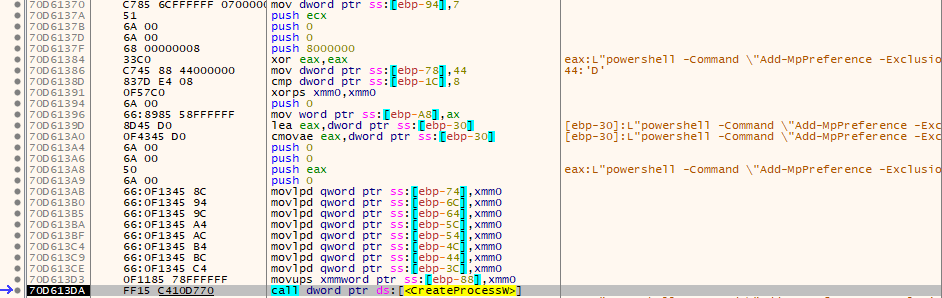
A few PowerShell commands are run thereby ensuring that its files and activity stay ignored, these commands add exclusions for the working directory and the malicious DLL from detection:
powershell -Command “Add-MpPreference -ExclusionPath ‘C:\ProgramData\client'”
powershell -Command “Add-MpPreference -ExclusionProcess ‘Utility.dll'”
Making Malicious Items Hidden
The malware is copied to the ProgramData folder and to evade casual inspection it modifies file attributes of the dropped components. During analysis, a call to SetFileAttributes was observed with the value 7 which made the copied folder hidden.

Registries Set
In the previous versions of ValleyRAT, configuration data, including the encoded C2 domain were likely written to HKCU\SOFTWARE\IpDates_info and a secondary key at HKCU\Console\0\451b464b7a6c2ced348c1866b59c362e stores encrypted binary data likely used for malware configuration or payload staging. but, in this case lpDates_info is stored with QWORD of 0s. The overall registry usage patterns combined with other behavioral and structural similarities strongly align with known ValleyRAT activity. We can conclude this malware is related to SilverFox APT.
Persistence
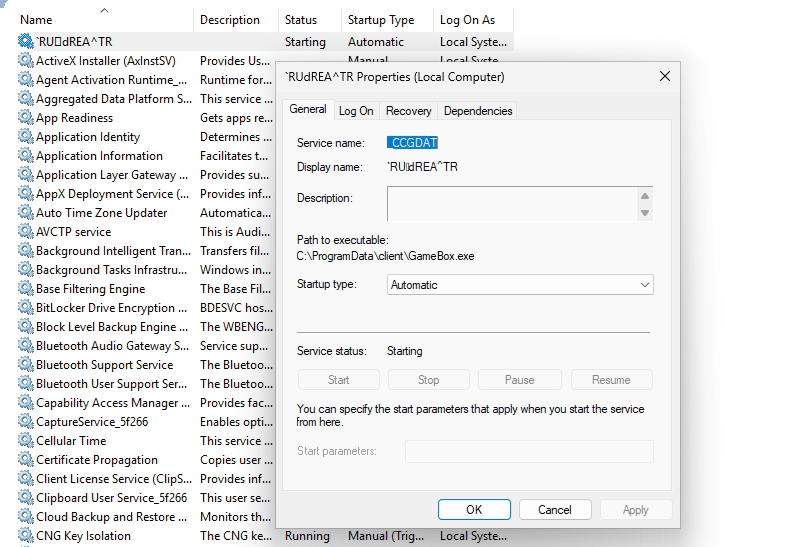
The sideloaded Utility.dll establishes persistence by creating a service named _CCGDAT, configured to start automatically when the system boots.
Payload Decryption
A primary shellcode payload user.dat is dropped by Installer in an AES encrypted form. During runtime, the malware performs decryption in memory before execution. By placing breakpoints around the decryption routine in x32dbg, the decrypted buffer was successfully captured from memory.
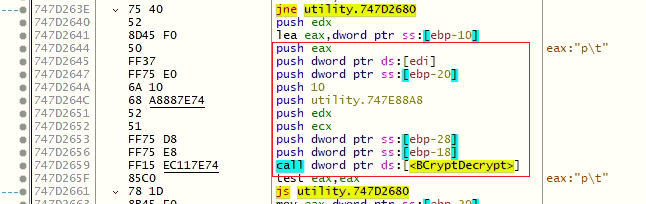
Analysis of the decrypted content revealed that it acts as a shellcode loader, responsible for staging further payload execution rather than containing the final malicious logic itself.
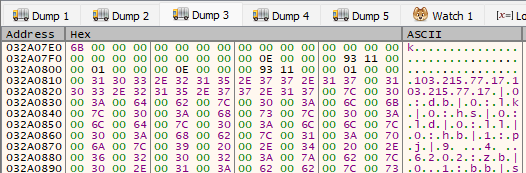
Analysis revealed a configuration string containing multiple reversed key value pairs at the end of of the second stage payload:
103.215.77.17|0:db|0:lk|0:hs|0:ld|0:ll|0:hb|1:pj|9.4.6202:zb|0.1:bb|smaet:zf|1:lc|1:dd|1:3t|08:3o|1.0.0.721:3p|1:2t|9944:2o|71.77.512.301:2p|1:1t|9944:1o|71.77.512.301:1p|
From the above, some of the key value pairs seem like toggle for malware features.
InProcess Shellcode Injection
Following decryption, the loader allocates memory within the current process and writes the decrypted shellcode into it. Execution is then transferred using CreateThread, allowing the payload to run entirely in-memory.

This technique avoids writing the payload to disk, significantly reducing detection by traditional file based security mechanisms.
API Hashing
Both the second stage loader and the third stage payload implement API hashing to resolve Windows API functions at runtime. Instead of storing API names in plain text, the malware computes hashes and dynamically matches them against exported functions from loaded modules.

XOR Decryption (3rd stage)
The third stage payload retrieved from the C2 server is stored in an encrypted format in memory. Unlike the initial AES layer, this stage uses a simpler custom XOR based encryption.
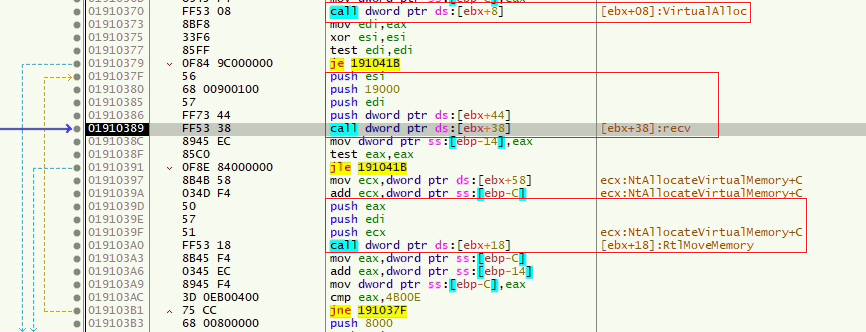
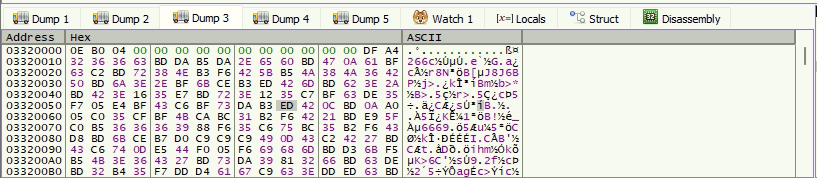
During debugging, the decryption loop was traced, and the payload was observed being transformed in place within the allocated buffer. Once decrypted, the dump clearly reveals shellcode containing PE structure, confirming it as the final malware stage.
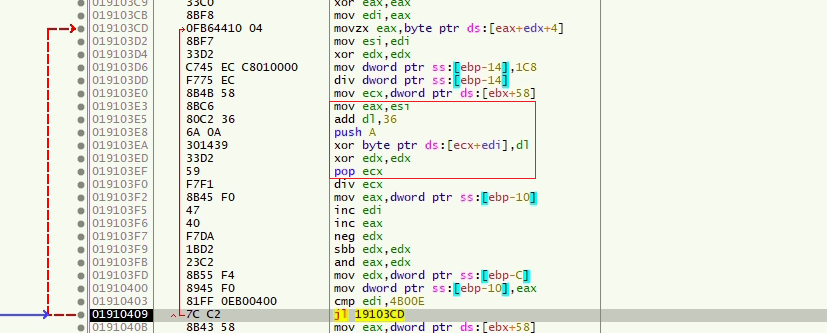
Since this payload is fetched dynamically from the C2 server, its content is not fixed and can be updated or replaced at any time, allowing the threat actor to deliver different payloads depending on the campaign or objective.
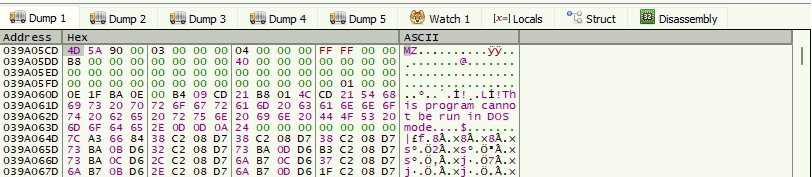
Post decryption, the payload consists of a shellcode loader followed by a fully functional ValleyRAT module. The loader uses Reflective Loading techniques to map the PE into memory. It invokes its exported function “load”, resulting in the execution of the malware within the current process.
Clipboard Theft
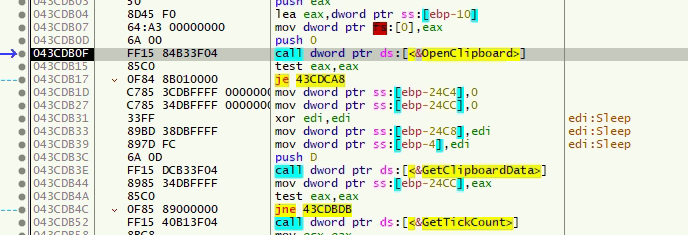
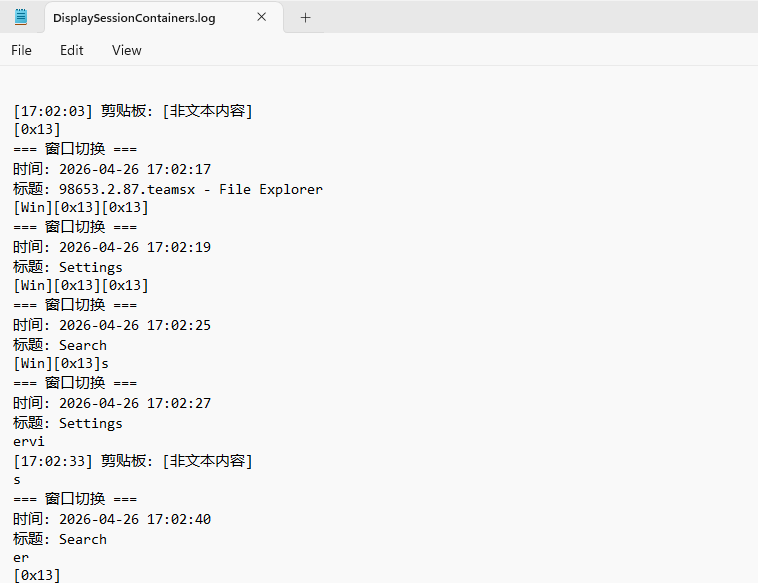
The malware actively monitors user activity by accessing clipboard contents through the GetClipboardData API. This behavior indicates an intent to capture sensitive information such as copied credentials, wallet addresses, or other user data.
Logging Activity
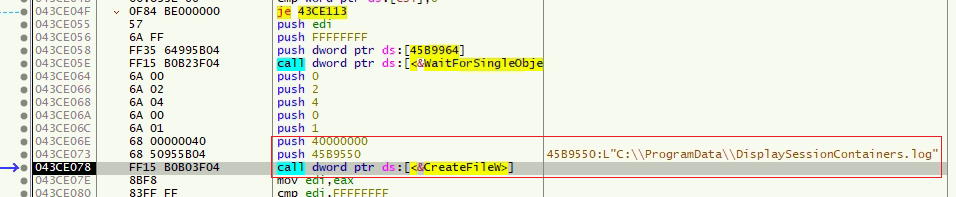
The malware creates local log files and stores operational data such as captured keystrokes, clipboard content, execution status etc. This suggests that the RAT maintains a local buffer of collected data before exfiltration to its command and control server.
Network Communication
Network activity analysis shows the malware establishing outbound TCP connections to its command and control (C2) infrastructure and maintaining communication with the remote server.
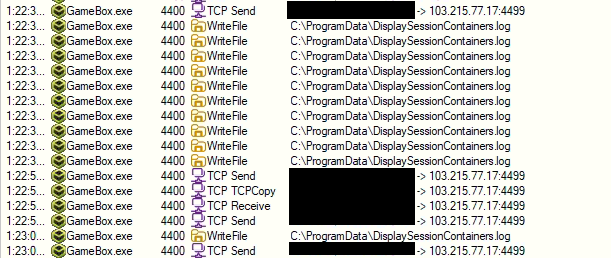
Observed behavior indicates that the malware not only receives instructions from the C2 but also sends collected data back to the server, including logs.
This campaign leverages convincing Microsoft Teams themed lures to deliver a multistage malware framework culminating in ValleyRAT deployment. The use of NSIS installers, DLL sideloading via legitimate binaries, and in memory execution demonstrates a clear focus on evasion and stealth.
Overall, this campaign reflects a well structured intrusion chain combining social engineering with advanced post exploitation capabilities, making it particularly effective against unsuspecting users.
IOC(s)
| File Name | Hash | Detection Name |
| 98653.2.87.teamsx.zip | 709604CE58E3F8255587AC9253DB6994 | Trojan ( 006ddd9e1 ) |
| Utility.dll | 18F3E85D7237E3CAC0AD13BDCF513F0F | Trojan ( 006ddd9e1 ) |
| User.dat | 8F9DE887E9AED9D580F386BA2D191319 | Trojan ( 0001140e1 ) |
C2
103[.]215[.]77[.]17