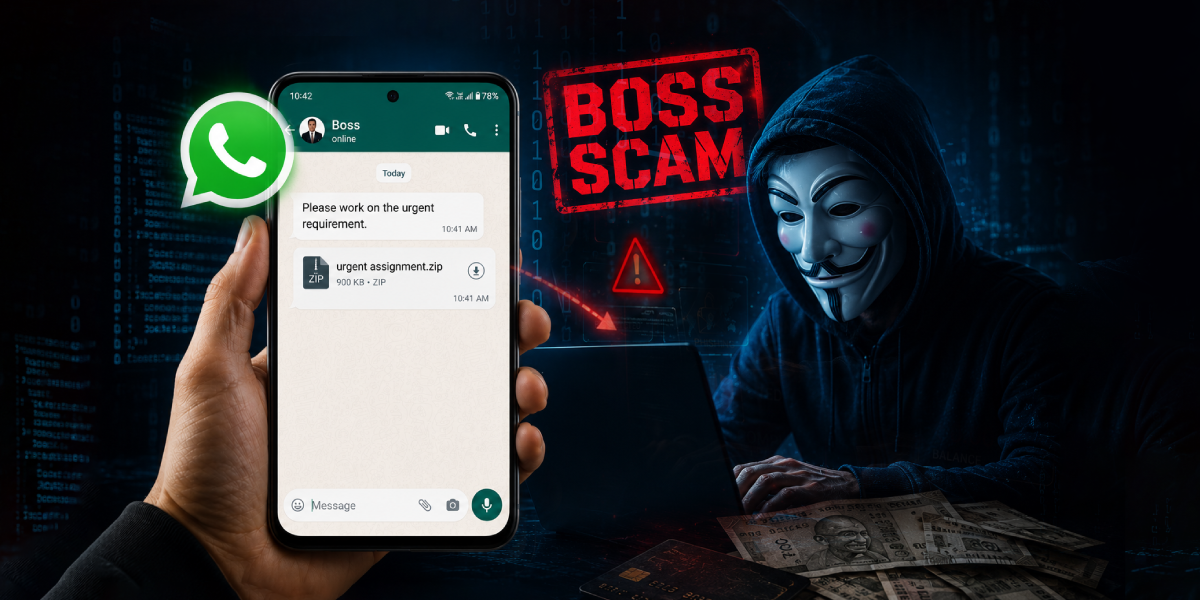
We are all familiar with cyber fraud involving suspicious emails or WhatsApp messages from unknown senders, and most of us think twice before opening such attachments. But what if the message comes from your own CEO, manager, or another trusted colleague? Would you still question it? Attackers are increasingly exploiting this trust through a technique known as a Boss Scam, a modern variation of Business Email Compromise (BEC) or CEO Fraud. In these attacks, cybercriminals impersonate senior executives or trusted employees to trick victims into opening malicious attachments, clicking fraudulent links or even making bank transfers. Recently, the Indian Cyber Crime Coordination Centre (I4C) issued an advisory warning about Boss Scam campaigns that target and compromise WhatsApp Web sessions belonging to business leaders, enabling attackers to impersonate trusted contacts and further spread the attack.
Attack Chain
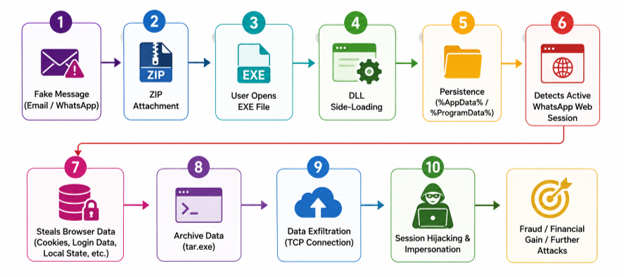
Flow
Initially the attacker sends an Email or a WhatsApp Message , with a zip attachment or a clickable URL that downloads the zip attachment, impersonating as the Reserve Bank of India or as someone from the Tax Department or from a random number as you can see in Fig. 2.1 and Fig. 2.2 below, stating that it’s an emergency and immediate action is required upon this message.
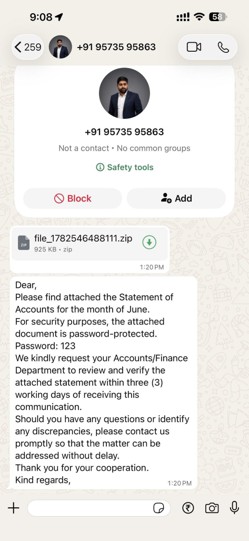
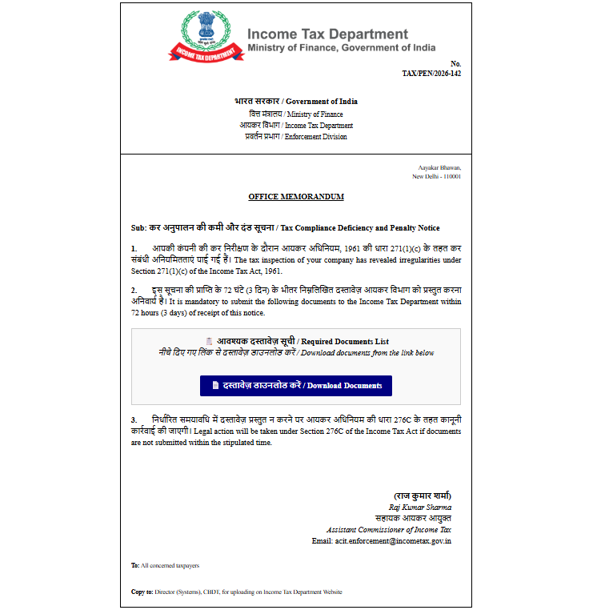
This is the important part to note where the zip file contains two files in it.
- One is an Executable file, which seems to be named like “Tax-Number”, “Read.exe”, “View.exe”, “Click to Open.exe” etc.,
- The other one is disguised as a supporting .dll file.

Once the user unknowingly opens(runs) the executable file, the system gets compromised. But how?
During analysis, the executable itself was found to be legit and was digitally signed. Its sole purpose is to sideload the malicious DLL by leveraging Windows’ DLL search order. When executed, Windows automatically loads the DLL located in the application’s current directory. This DLL sideloading technique is commonly used by attackers to execute malicious code while appearing to run a legitimate application, and it can help evade certain antivirus detection mechanisms.
Once the malware is executed, it creates a mutex to ensure that only a single instance of itself is running. As shown in Fig. 2.4, the mutex is successfully created during execution.
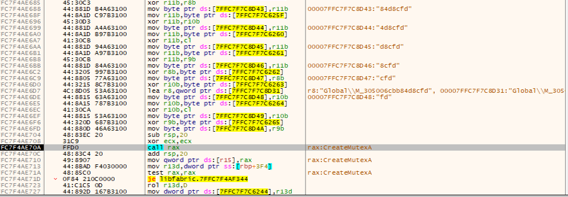
In some variants, the Dynamic API Resolution technique is also used to evade traditional Antivirus shown in Fig 2.5.
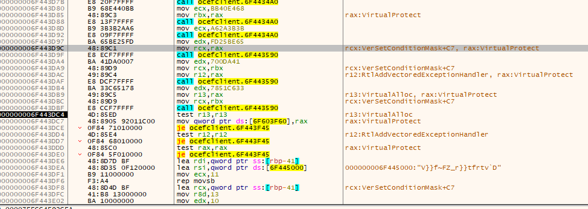
The malware also creates Registry Run entries to achieve persistence can be seen in Fig. 2.6, ensuring it is automatically executed whenever the user logs on to the system. This allows the malware to survive system reboots and maintain continued access to the compromised device.
In some variants of this malware family, the malware takes Screenshots (shown in Fig 2.7) of the entire screen and sends it to the attacker frequently.
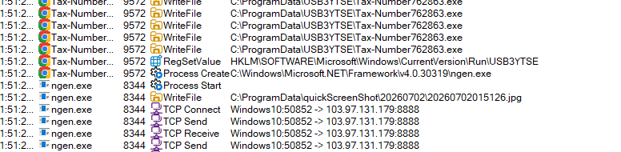
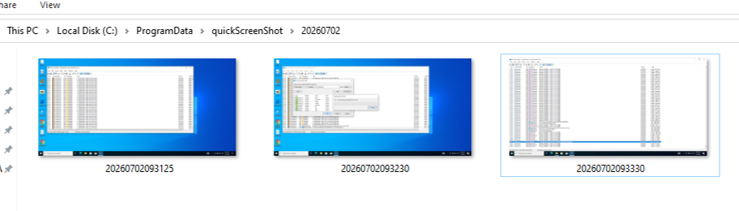
It self-copies (both the executable and the dll file) to %AppData% or %ProgramData% directory. After successfully copying the files, it terminates the original process and relaunches itself from the new location. This behavior helps the malware establish a more persistent presence on the system, execute from a less suspicious directory, and reduce the likelihood of detection or removal.
It runs in the background till it finds an active WhatsApp Web session in Chromium-based browsers such as Google Chrome and Microsoft Edge. Once an authenticated WhatsApp Web session is identified, it collects browser session artifacts, including authentication tokens, cookies, encryption material, and other browser data required to potentially restore or hijack an authenticated WhatsApp Web session.
The collected data is archived using “tar.exe”, a legitimate Windows command-line utility for creating, listing, and extracting file archives, as shown in Fig. 2.8. Instead of using its own compression library, the malware abuses this built-in Windows utility as a Living-off-the-Land Binary (LOLBin). By relying on a trusted system tool, the malware reduces its footprint and may evade detection by some security solutions.

Command Line: C:\Windows\System32\tar.exe -caf “C:\Users\<users>\AppData\Local\Microsoft\Edge\Edge_9821bea4d01b4ae4c6626ad474d55194.zip” –exclude=”Cache” –exclude=”Safe Browsing” –exclude=”Ad Blocking” -C “C:\Users\<users>\AppData\Local\Microsoft\Edge\Backup_12248”
Once the data is collected and archived into a ZIP file, it is transmitted to the attacker over a TCP connection. Using the collected data, the attacker can potentially restore or hijack the victim’s active WhatsApp Web session, allowing them to impersonate the victim.
If the compromised WhatsApp account belongs to a CEO, manager, finance officer, or any trusted employee, the attacker can use the existing conversation history and contact list to send convincing messages to colleagues. These messages typically impersonate the legitimate account owner and urge recipients to urgently open a ZIP attachment or click a malicious download link, claiming it is related to tax documents, invoices, compliance requirements, or other business matters. Because the message originates from a trusted contact, employees are far more likely to believe it and execute the malicious attachment as it was sent to them via WhatsApp and are far less likely to suspect it, allowing the attack to spread further within the organization.
Here are the details of files/data that have been compromised.
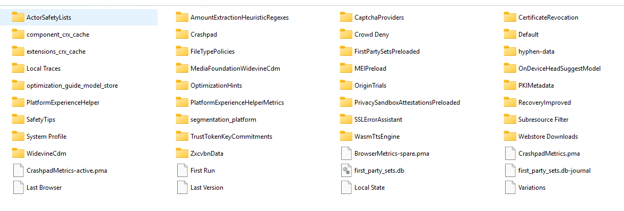
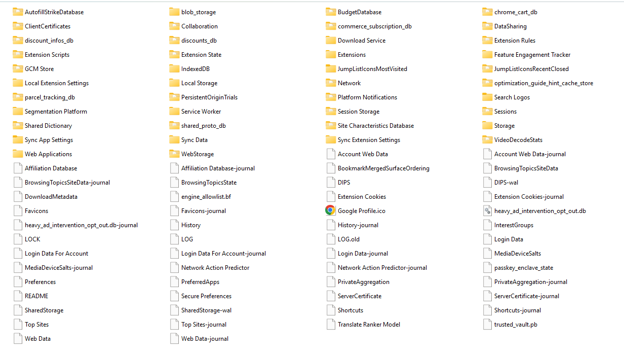
From the list of compromised files, it is evident that the attacker can not only potentially replicate the victim’s active web session but also gain access to a significant amount of personal and sensitive data stored by the browser and associated applications.
Once the attacker gains access to the victim’s authenticated WhatsApp Web session, the objective shifts to expanding the compromise within the organization. Using the victim’s contacts and conversation history, the attacker targets managers, finance personnel, HR staff, executives, and other trusted contacts. If a higher-privileged account, such as that of a CEO or finance officer, is compromised, the attacker may impersonate them to request fraudulent fund transfers, obtain confidential business documents, banking and payment information, customer and employee records, or other sensitive corporate data. The compromised account can also be used to distribute additional malware, such as information stealers, Remote Access Trojans (RATs), or ransomware, to other employees and external contacts, enabling the attack to spread further throughout the organization.
There is also high risk for credential theft, Cookie theft, Session Hijacking in other platforms, Autofill theft, Token theft, User reconnaissance etc.,
A cross reference to the sensitive artefacts in a system and their corresponding potential for abuse by a threat actor can be seen in Table 2 below.
| File / Folder | Contains | Why It’s High-Risk |
| Local State | Master AES encryption key for the profile | The single most critical file that decrypts Cookies, Login Data, and IndexedDB. Without it, everything else is unreadable. Also, the first key needed to clone the WhatsApp Web session. |
| Network\Cookies | Active session cookies for all logged-in sites | Directly enables session hijacking with no password needed; this is the file that proves to WhatsApp’s (or other site’s) servers that the browser is already authenticated. |
| IndexedDB | App-level session/auth tokens, including WhatsApp Web’s client-side encryption and device-linking keys | The core artifact for cloning WhatsApp Web specifically lets the attacker’s browser present itself as the same linked device without a fresh QR scan. Also holds auth tokens for other modern web apps. |
| Login Data | Saved usernames and passwords | Direct, reusable credential theft across every saved site login. |
| Web Data | Autofill data, saved addresses, payment card details | Enables direct financial fraud and identity data harvesting. |
Table 2: High-risk browser files and their security impact
Mitigation and Recommendations
Organizations and users can significantly reduce the risk of this attack by implementing a combination of user awareness, endpoint protection, and browser security for best practices.
- Treat password-protected ZIP attachments from unexpected senders as a red flag rather than a formality, since this is a known technique to bypass email security scanning.
- Be cautious of unsolicited emails or WhatsApp messages requesting immediate action, even if they appear to originate from your CEO, manager, or other trusted contact.
- Never execute files received through email or messaging applications unless their authenticity has been verified.
- Configure Windows to display file extensions to help identify executable files masquerading as documents.
- Avoid keeping unnecessary browser sessions logged in, especially sensitive applications such as the WhatsApp Web.
- Enable Multi-Factor Authentication (MFA) wherever supported.
- Use a good Antivirus Product like K7 Antivirus.
Already compromised or Suspected to be compromised?
- Run a full scan with an updated Antivirus product like K7 Antivirus Products and quarantine any files matching the dropped executable/DLL pattern in %AppData% or %ProgramData%.
- Regularly review and terminate unused WhatsApp Web linked devices.
- Rotate passwords for accounts saved in the browser password manager, starting with email, banking, and work accounts.
- Revoke and reissue browser session cookies where possible and sign out of all active sessions of sensitive services.
- Notify your IT security team and any contacts who may have received messages from your account after you have been compromised.
- Check the Registry Run key and Task Scheduler for unfamiliar entries pointing to the copied executable and remove them after confirming with your security team.
Conclusion
This attack shows that cybercriminals do not always rely on advanced hacking techniques; they often rely on trust and deception. By disguising malware as a legitimate file and stealing browser data, attackers can potentially hijack active sessions, access sensitive information, and impersonate the victim.
To stay protected, always verify unexpected requests from trusted contacts, avoid opening suspicious attachments, keep a reputable antivirus or endpoint security solution enabled and up to date, and regularly install security updates. User awareness, combined with good security practices, remains one of the most effective defenses against these evolving threats.
IOCs
Attachment URL – hxxps://zusyyredrs[.]love/
| Hash | Details | Detection Name |
| 91C8497847FF6AAFE365AE731E76F031 | libfabric.dll | Trojan ( 0001140e1 ) |
| AAEFAA9844410991BDDAE304B93673C6 | libfabric.dll | Trojan ( 0001140e1 ) |